
Selecting a Tone
The Digital Piano contains 28 tone types for all keys, including grand piano tones, 10 tone types from the Classical Piano Repertoire, and one bass tone scheme dedicated to the bass section.
-
The tone names are marked on the upper side of the keyboard section of the Digital Piano (except for the Classical Piano Repertoire tones).
For more information, see “Using the Keyboard to Select a Tone”.

-
In addition to selecting a single tone to play across the keyboard, two tones can be played on top of each other (Layer), and the bass tone can be assigned to the bass section.
For details, see “Layering Two Tones (Layer)” and “Splitting Left and Right Keys (Split)”.
Grand Piano Tone Features
This Digital Piano has three types of grand piano tones: BERLIN GRAND, HAMBURG GRAND, and VIENNA GRAND. The grand piano tones each have different characteristics, so we recommend you choose the one that best suits the music you play and your preferences.
|
Tone Name |
Characteristic |
|
|
BERLIN GRAND |
The sound has a clear outline, and is calm, elegant and light. The transparent sound and resonance create a beautiful melody rich in color. Suitable for playing impressionistic music. |
|
|
BRIGHT |
A bright and clear BERLIN GRAND tone. |
|
|
MELLOW |
A warm and calm BERLIN GRAND tone. |
|
|
HAMBURG GRAND |
This is strong and powerful with a wide range of dynamic expression; an elegant and polished sound beloved by many pianists. It can be used for all kinds of performances. |
|
|
BRIGHT |
A bright and clear HAMBURG GRAND tone. |
|
|
MELLOW |
A warm and calm HAMBURG GRAND tone. |
|
|
VIENNA GRAND |
This tone has an understated sound with rich expressiveness, powerful low frequency strings and a soft and delicate sound when notes are played gently. It is suitable for playing classical music. |
|
|
BRIGHT |
A bright and clear VIENNA GRAND tone. |
|
|
MELLOW |
A warm and calm VIENNA GRAND tone. |
|
Classical Piano Repertoire Tone Features
|
Tone Name |
Characteristic |
|
SONATA GRAND |
The sound changes throughout the dynamic range from softly played notes to strongly played notes. Suitable for playing dramatic music such as piano sonatas. |
|
CONCERT ETUDE GRAND |
The sound is shimmering and clear. Suitable for playing music that must be clearly audible to others, such as that played at a concert. |
|
ETUDE GRAND |
The sound quality is stable, granular and easy to hear, and has a solid dynamic range. This piano tone is ideal for everyday practice. |
|
PRELUDE GRAND |
The sound is soft, sparkling and full of character. Suitable for playing freestyle pieces such as preludes. |
|
ROMANCE GRAND |
The sound is soft and delicate with contours that accentuate the melody. Suitable for playing lyrical, instrumental works. |
|
PARTITA GRAND |
The sound is granular and has a light touch with moderate resonance. Suitable for playing pieces such as music for keyboard instruments from the Baroque period. |
|
NOCTURNE GRAND |
It has a beautiful melodious expression with a soft sound. Suitable for playing subdued and beautiful melodies reminiscent of the night, such as nocturnes. |
|
WALTZ GRAND |
The sound is bright and light, flamboyant and graceful. Suitable for playing fun and graceful dances like waltzes. |
|
POLONAISE GRAND |
The sound is imposing and powerful, with rhythmic patterns and resonant, full chords. Suitable for playing solemn and heroic music such as polonaises. |
|
LITTLE PIECE UPRIGHT |
It is the sound of an upright piano with a rustic, nostalgic feeling. Suitable for playing little pieces reminiscent of childhood. |
Selecting a Single Tone
Using the Keyboard to Select a Tone
-
While holding down the “TONE” button, press one of the C{3 to E}6 keys.
Selecting a Setting Value Directly (operation type A)
-
See “Tone List” for the tones available for each key.

-
Selecting Tones in the Order of the Tone List
-
While holding down the “TONE” button, press the B2 or C3 key.
Using the +/– Keys to Raise or Lower the Setting Value by 1 (operation type B)

Keyboard
Setting
B2
Selects the previous tone (–)
C3
Selects the next tone (+)
Using the Touch Button to Select a Tone
-
Touch the “BERLIN GRAND” button, the “HAMBURG GRAND” button, or the “VIENNA GRAND” button.
-
The grand piano tone corresponding to the button pressed is selected.

-
-
Touch the “TONE” button.
-
The last tone selected using the keyboard (BERLIN GRAND by default) is selected.

-
Layering Two Tones (Layer)
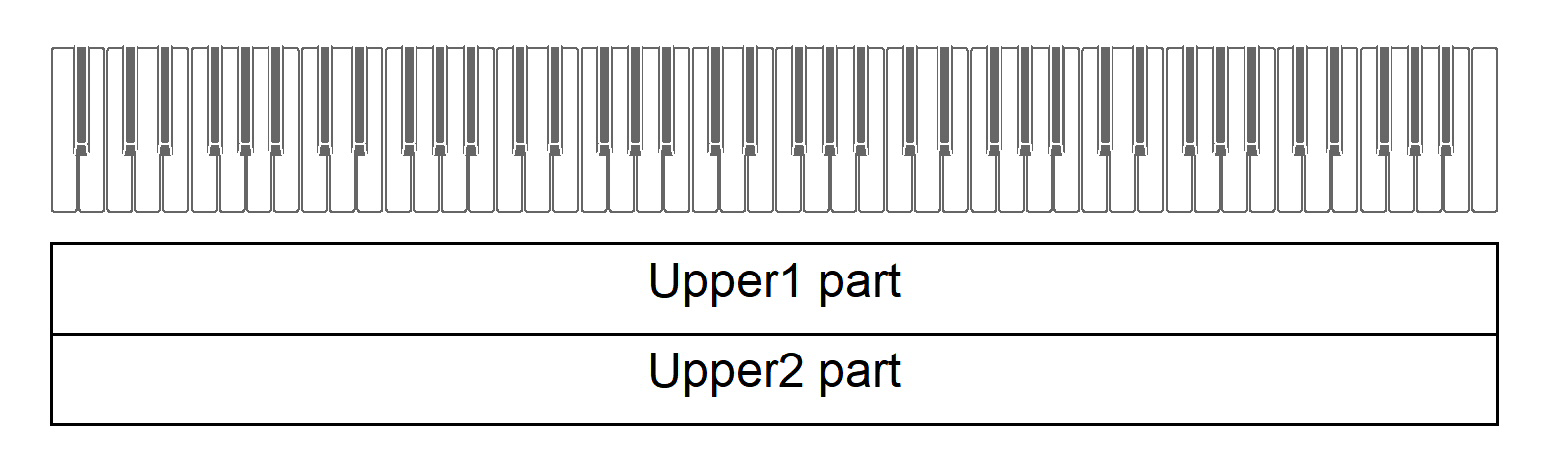
You can have two tones sounding simultaneously when playing the keyboard. Since the tones are layered over each other, this feature is called Layer. The first tone selected is called the Upper1 part tone and the second tone selected is called the Upper2 part tone. When [Layer] is set to <On>, Upper1 and Upper2 parts will both sound at the same time.
Turning Layer On/Off
-
While holding down the “TONE” button, press the C7 key (Layer).
Switching On/Off or Changing Setting Values Using a Single Key (operation type D)

-
Default value: Off
|
Setting Value |
Setting Details |
|
Off |
Turns Layer off. |
|
On |
Turns Layer on. |
Selecting the Upper2 Part Tone
You can select the Upper2 part tone when [Layer] is set to <On>.
-
Turn [Layer] <On>.
-
While holding down the “TONE” button, press one of the C{3 to E5 or F{5 to E}6 keys to select the tone for the Upper2 part.
Selecting a Setting Value Directly (operation type A)

Changing the Upper1 Part Settings
You can adjust the volume and perform Upper1 octave shift.
For details, see “Changing the Upper1 Part Settings” and “Shifting Upper1 Part by an Octave”.
Changing the Upper2 Part Settings
You can adjust the Upper2 part volume and perform octave shift.
For details, see “Changing the Upper2 Part Settings” and “Shifting Upper2 Part by an Octave”.
Splitting Left and Right Keys (Split)
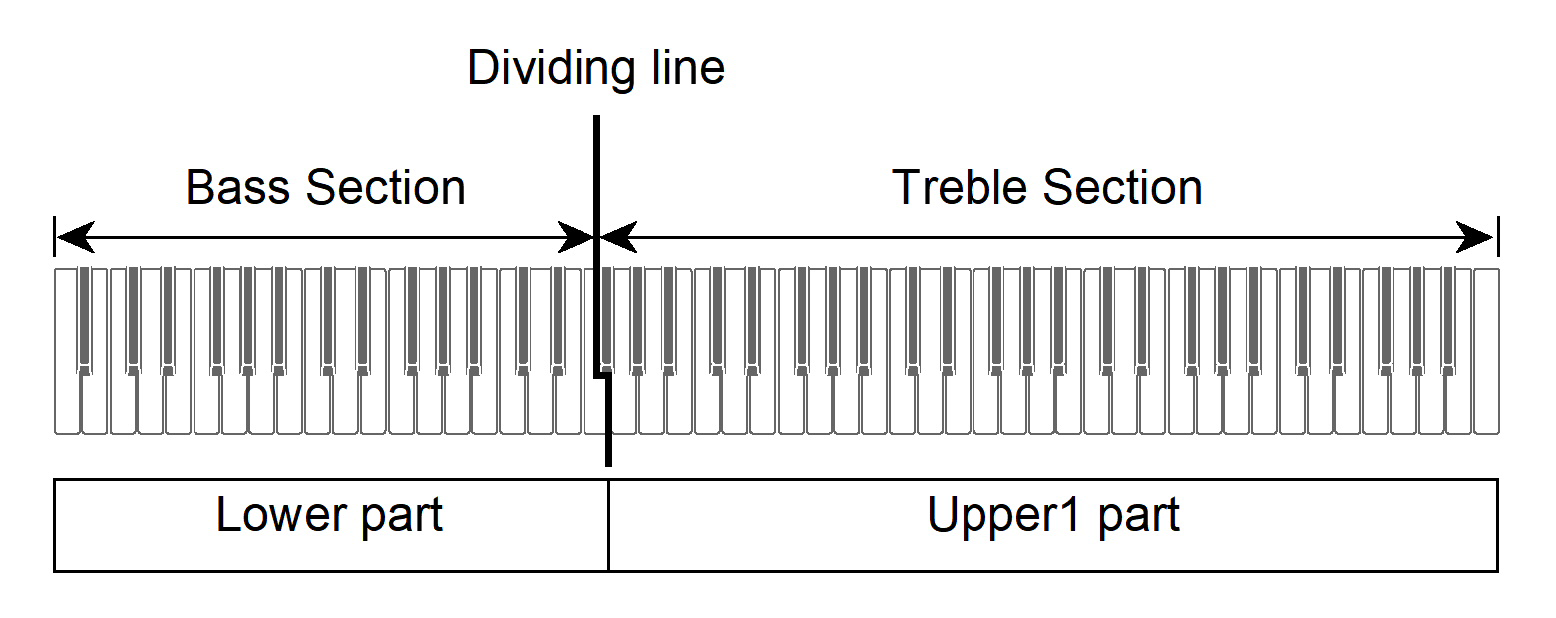
You can select a tone dedicated to the bass section <BASS (LOWER)> to play bass notes in the bass section of the keyboard. This usage is called Split, since the entire keyboard is split into left and right. The tone of the bass section is called Lower Tone Section, and the tone of the treble section is called Upper1 Tone Section.
Selecting a Tone Exclusively for the Bass Section
-
While holding down the “TONE” button, press the F5 key (BASS).
Selecting a Setting Value Directly (operation type A)

-
Only the bass section of the keyboard (left side) will have the BASS tone, while the treble section (right side) will remain the same as the previously selected tone.
-
Changing the Lower Part Settings
You can change the volume and other settings for the Lower Part.
For more information, see “Changing the Lower Part Settings”.
Changing the Upper1 Part Settings
You can adjust the volume and perform Upper1 octave shift.
For details, see “Changing the Upper1 Part Settings” and “Shifting Upper1 Part by an Octave”.