
Part Names and Functions
-
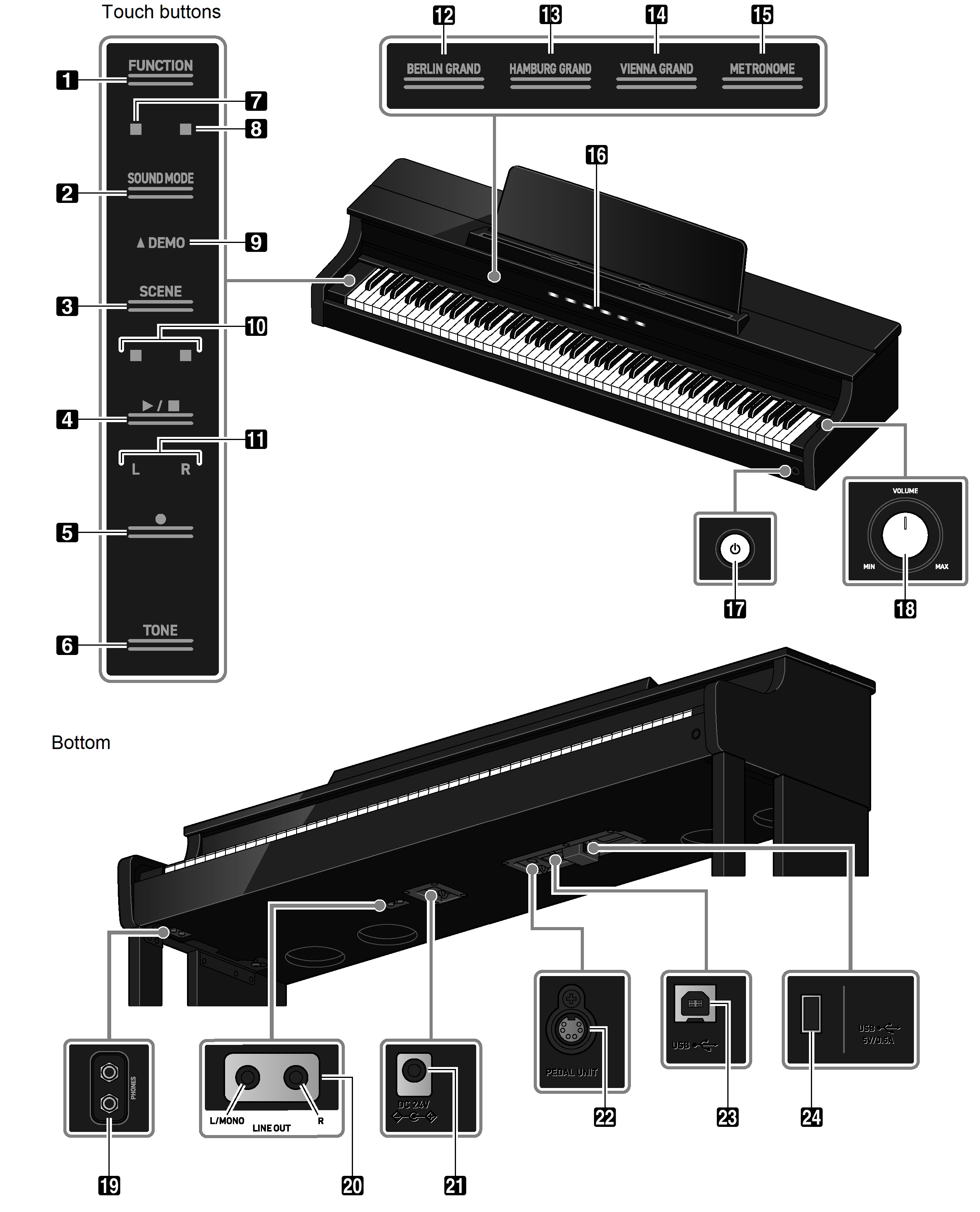
FUNCTION button
Used for basic settings.
-
SOUND MODE button
Used to change settings such as [SOUND MODE].
-
SCENE button
Use to change scene and metronome settings.
-
a button
Use to play/stop a song.
-
0(REC) button
Use to record performances.
-
TONE button
Use to select tones and change tone settings.
-
Hall Simulator/Reverb Indicator
Lights up when [Hall Simulator/Reverb] is set to <On>.
-
Surround Indicator
Lights up when [Surround] is set to <On>.
-
DEMO Indicator
Lights up when a demo song is playing.
-
Beat Indicator
The left side blinks on the first beat and the right side blinks on the remaining beats in time, such as when a song is playing.
-
Track Indicator
During Record/Playback, “L” lights up to indicate the part of the track for the left hand, and “R” lights up to indicate the part of the track for the right hand.
-
BERLIN GRAND button
Sets the tone to <BERLIN GRAND>.
-
HAMBURG GRAND button
Sets the tone to <HAMBURG GRAND>.
-
VIENNA GRAND button
Sets the tone to <VIENNA GRAND>.
-
METRONOME button
Used to turn the metronome On/Off
-
Visual Information Bar
Notifies you of various pieces of information with a light.
-
P(Power) button
Turns main power On/Off. The outer circumference of the button indicates Bluetooth® connection status by the color of the light.
-
Volume knob
Adjusts the volume of the Digital Piano.
-
PHONES jacks
-
LINE OUT R, L/MONO jacks
-
Power supply terminal (DC 24V)
-
PEDAL UNIT jack
-
USB Type B port
-
USB Type A port