
Precautions for Use
Setup environment
-
Set this Digital Keyboard up on a stable and level surface.
-
Do not set this Digital Keyboard up in locations subject to extreme temperature and humidity changes.
Care of this Digital Keyboard
-
Wipe with a soft, dry cloth. Do not use tissues, as they scratch the surface easily.
-
If you are concerned about dirt or stains, soak a soft cloth in diluted neutral detergent and wring it out tightly, gently wipe off the dirt or stains, and lightly wipe the instrument’s surface with a soft, dry cloth.
-
Do not use cleaners containing benzine, organic solvents, cleaning agents containing alcohol, chlorine disinfectants, alcohol-type sanitizing sheets, etc., as they may cause discoloration, deterioration, paint peeling, cracking and so on.
Sterilizing and disinfecting
-
Wipe with a non-alcoholic sanitizing sheet two or three times, then finish with a light wipe using a soft, dry cloth.
-
Note that not wiping the area dry will leave marks.
-
If more than one person will be using the product, we recommend that each person disinfects their hands before and after use.
Accessories and Optional Products
Use the supplied accessories and optional products specified for this Digital Keyboard.
Using products other than those specified may cause fire, electric shock, or injury.
Weld lines
There are some areas that look like streaks on the exterior, but these are weld lines created by the resin molding process, and are not cracks or scratches. They do not affect use in any way.
AC adaptor
-
The AC adaptor which is specified for this Digital Keyboard (JEITA standard, with uniform polarity plug) should be used only for this Digital Keyboard. Never connect it to other equipment. Doing so may cause a malfunction.
-
The AC adaptor cannot be repaired.
In the event of damage or malfunction, contact the number for repair inquiries.
-
AC adaptor operating environment:
-
Temperature: 0 to 40°C
-
Humidity: 10% to 90% RH
-
-
Output polarity: &
-
Use of other AC adaptors may cause smoke or a malfunction.
Precautions to prevent wire breakage
-
Do not pull hard on the cord.
-
Do not repeatedly pull on the cord.
-
Do not bend the base of the cord.
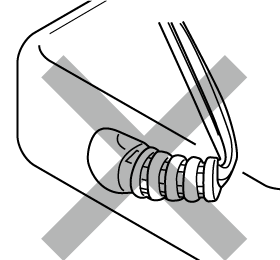
-
Do not wrap the cord around the AC adaptor.
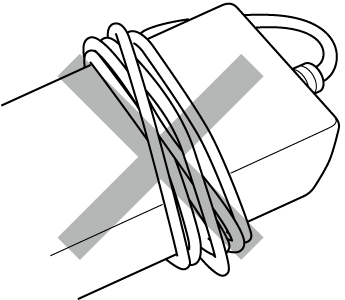
-
Always disconnect the AC adaptor from the power outlet when moving the Digital Keyboard.
Where the AC adaptor should be used
-
Use the AC adaptor in the following locations.
-
Places free from dripping water
As it is designed for indoor use only, do not place the AC adaptor in a place where it may get wet, or place a vase filled with water on top of the adaptor.
-
Places free from humidity
-
Spacious and well-ventilated places
Do not cover with newspaper, tablecloths, curtains, and so forth.
-
Places where an electrical outlet is located nearby
In the event of a malfunction, the Digital Keyboard should be immediately disconnected from the power outlet.
-