
Connecting via Bluetooth Audio
By following the steps below to connect the Digital Keyboard to an external device via Bluetooth audio, the sound of the external device can be played from the speakers of the Digital Keyboard.
Playing sound from devices supporting Bluetooth audio via the Digital Keyboard (Bluetooth audio pairing)
Pairing for Bluetooth audio
-
Plug the supplied Wireless MIDI & audio adaptor into the USB Type A port.
-
Have a device ready that supports Bluetooth audio connectivity.
-
The following steps assume that the device to which you will connect is a smart device.
-
-
Open the Bluetooth settings screen of the smart device, and switch Bluetooth on if it is off.
-
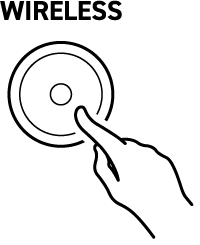
Press and hold the WIRELESS button.
-
The Digital Keyboard enters pairing standby, a notification tone sounds approximately every three seconds, and the WIRELESS button begins to blink in time with the notification tone.
-
“WU-BT10 AUDIO” appears on the Bluetooth settings screen of the smart device.
-
-
Tap “WU-BT10 AUDIO” on the Bluetooth settings screen of the smart device to pair it with the Digital Keyboard.
-
When pairing is complete, the Digital Keyboard’s WIRELESS button blinks twice and a notification tone sounds, after which the WIRELESS button lights up.
-
If the Bluetooth audio connection does not work properly
-
Delete the pairing registration for the Digital Keyboard.
-
For details, see “Deleting a pairing registration”.
-
-
If pairing registration information from this Digital Keyboard remains on the external device, delete it.
-
Delete “WU-BT10 AUDIO” from the Bluetooth settings screen of the external device. For how to do this, see the external device’s instruction manual.
-
-
Try the Bluetooth audio pairing again.
-
Refer to “Pairing for Bluetooth audio”.
-
Center localization cancellation of input audio (AUDIO IN center cancel)
The sound of vocals input to the Digital Keyboard from an external device can be cut (deleted or lowered in volume). For details, see “Switching AUDIO IN Center Cancel On/Off”.
Deleting a pairing registration
Here’s how to delete pairing registrations between the Digital Keyboard and external devices connected via Bluetooth audio.
-
Plug the supplied Wireless MIDI & audio adaptor into the USB Type A port.
-
Press and hold the FUNCTION button, and press the B}6 key.

-
A notification tone will sound, and the Bluetooth audio pairing registration will be deleted.
-
-
Release the FUNCTION button.