
Connecting to a Computer or Smart Device via Cable (MIDI Data Transmission/Reception)
Use a USB cable to connect the Digital Keyboard to a computer or smart device. This makes it possible to transmit and receive performance information (MIDI data) between the Digital Keyboard and a computer or smart device. You can use music software on your computer or a smart device app to record your performance on this Digital Keyboard, or send data from your computer or smart device to this Digital Keyboard to play its sounds.
Connecting to a computer via USB
Required operating environment
The operating environment required on your computer to transmit and receive MIDI data is as follows. Be sure to confirm your computer’s environment in advance.
-
Supported operating systems
Windows 11
macOS 14, 15, 26
-
Other requirements:
USB port
MIDI-compatible music software (such as commercially available products)
Connecting the Digital Keyboard to a computer via USB
-
Turn off the Digital Keyboard and turn on your computer.
-
Do not launch the music software on your computer yet.
-
-
Connect the USB Micro B port of the Digital Keyboard to your computer using a commercially available USB cable.
-
Use a cable with a USB Micro B (USB 1.1 or 2.0) type plug on the Digital Keyboard side, which supports data transfer. Charging cables are not compatible.
-
-
Turn on the Digital Keyboard.
-
When the Digital Keyboard is connected to a computer for the first time, the driver required to send and receive data is automatically installed on the computer.
-
-
Launch the music software on your computer.
-
In the music software settings of your computer, select “CASIO USB-MIDI” as the MIDI device.
-
See the manual of your music software for information on how to select a MIDI device.
-
Connecting to a smart device via USB MIDI
About verified smart devices
For information on smart devices that have been verified to connect via USB-MIDI with the Digital Keyboard, refer to “Operating System Compatibility” at the website below.
https://support.casio.com/global/en/emi/manual/CT-FS1/
Making a USB MIDI connection between the Digital Keyboard and a smart device
-
Turn on the Digital Keyboard and the smart device.
-
Connect the smart device to the USB Micro B port of the Digital Keyboard using a commercially available USB cable.
-
For details on cables that can be used for connection, see “Operating System Compatibility” at the website below.
https://web.casio.com/app/en/music_space/support/connect.html
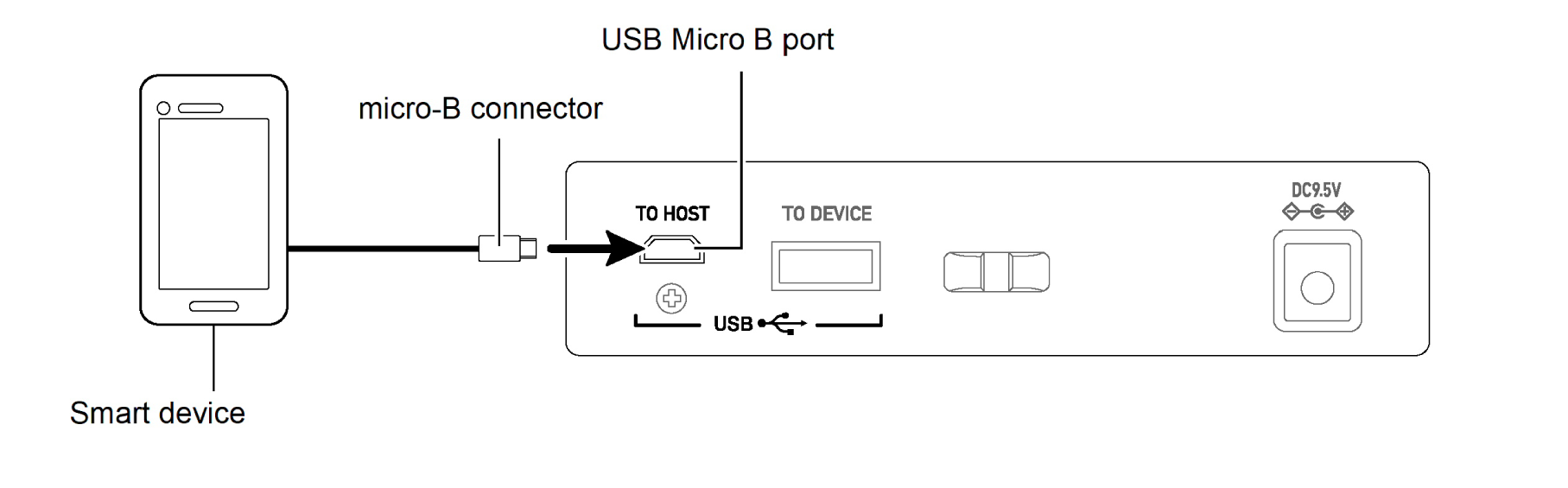
-
-
Launch the MIDI-compatible app on your smart device.
-
After you connect the Digital Keyboard to your smart device, you will use the app on the smart device to perform various operations. For details on the various operations, refer to the app manual or help contents.
-
When using CASIO’s dedicated app, if a successful connection is made, the message “Connecting” will appear on the smart device screen, followed by the message “Connected”.
-
MIDI settings of the Digital Keyboard
For details on the MIDI settings of the Digital Keyboard, see “MIDI-Related Settings”.