
Adjusting the Volume Balance Between the Song and Keyboard Performance
The balance between the volume of the song being played and the volume of your keyboard performance can be adjusted in ±5 steps (within a –5 to +5 range). The higher the value, the louder the keyboard will be compared to the song volume; and the lower the setting value, the quieter the keyboard will be compared to the song volume.
|
Setting values |
–5 |
to |
0 (default value) |
to |
+5 |
|
Song volume |

|
|

|
||
|
Keyboard volume |

|
|
|
Adjusting the volume balance
-
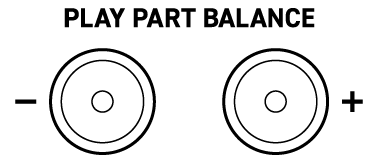
Press the PLAY PART BALANCE + or – button.
|
To do this: |
Operate as follows: |
|
Lower the volume balance setting by 1 |
Press the – button. |
|
Increase the volume balance setting by 1 |
Press the + button. |
|
Restore the default value |
Press both buttons at the same time. |
-
When the setting value is 0, both the – and + buttons light up. Also, only the + button lights up when the setting value is positive, and only the – button lights up when the setting value is negative.