
Sustaining Notes After Keyboard Keys Are Released
When Sustain is turned on, the sound will be audible for longer than usual after the key has been released.
Turning sustain on/off
The default setting for sustain on this Digital Keyboard is off. Follow the steps below to switch the setting on/off.
-
Press and hold the FUNCTION button, and press the C6 key.
-
Do not release the FUNCTION button until step 2.

-
Each time you press the C6 key, the setting toggles between on and off. A notification tone signals which setting you have switched to after you press a key.
Notification tone
Setting
High note plays
On
Low note plays
Off (default setting)
-
-
To exit the settings, release the FUNCTION button.
Changing the sustain length of each part’s sound (sustain time)
The length that the sound sustains (sustain time) when sustain is on can be changed separately for the main part and the layered part.
The sustain time value can be set from 0 to 9 (default value: 5). A value of 0 almost completely removes the sustaining sound, and a value of 9 produces the longest sustaining sound.
-
For the main part and the layered part, see “Layering Two Tones”.
Changing the sustain time of the main part
-
Press and hold the FUNCTION button, and press the D6 key.
-
Do not release the FUNCTION button until step 3.

-
-
Use the C4 to E5 keys to change the sustain time setting.
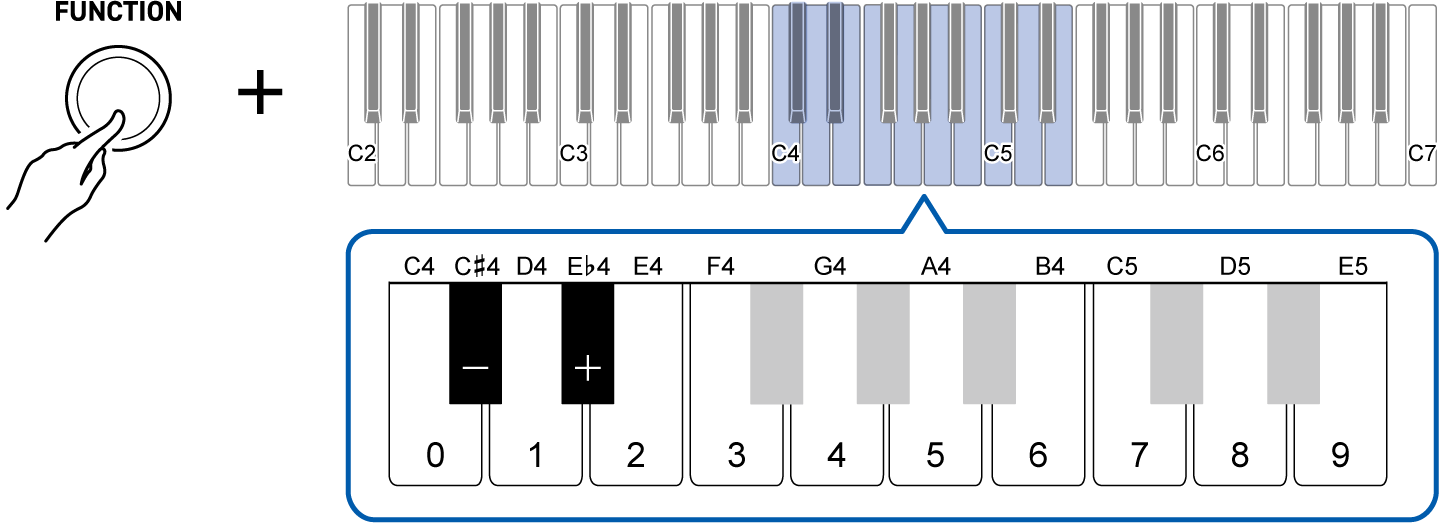
To do this:
Operate as follows:
Lower the setting by 1
Press the C{4 (–) key.
Raise the setting by 1
Press the E}4 (+) key.
Directly input the value
Use the C4 (0) to E5 (9) keys to input the value.
Restore the default value
Press the C{4 (–) key and the E}4 (+) key at the same time.
-
If the value is 0, a reference tone is played.
Note:
Even while the FUNCTION button is held down, playing any key other than C4 to E5 will produce an instrument sound. You can check the sustaining sound by playing the keyboard while making this setting.
-
-
To exit the settings, release the FUNCTION button.
Changing the sustain time of the layered part
Press the E6 key instead of the D6 key in step 1 of “Changing the sustain time of the main part”.

After that, the operation is the same as that for the main part.