
Fine Tuning (Tuning)
Here’s how to shift the overall pitch of the Digital Keyboard slightly. You can set the frequency of the A4 note from 415.5 to 465.9 Hz (default value: 440.0 Hz).
-
Press and hold the FUNCTION button, and press the B3 key.
-
Do not release the FUNCTION button until step 3.

-
-
Use the C4 to E5 keys to set the pitch (frequency value) of the notes.
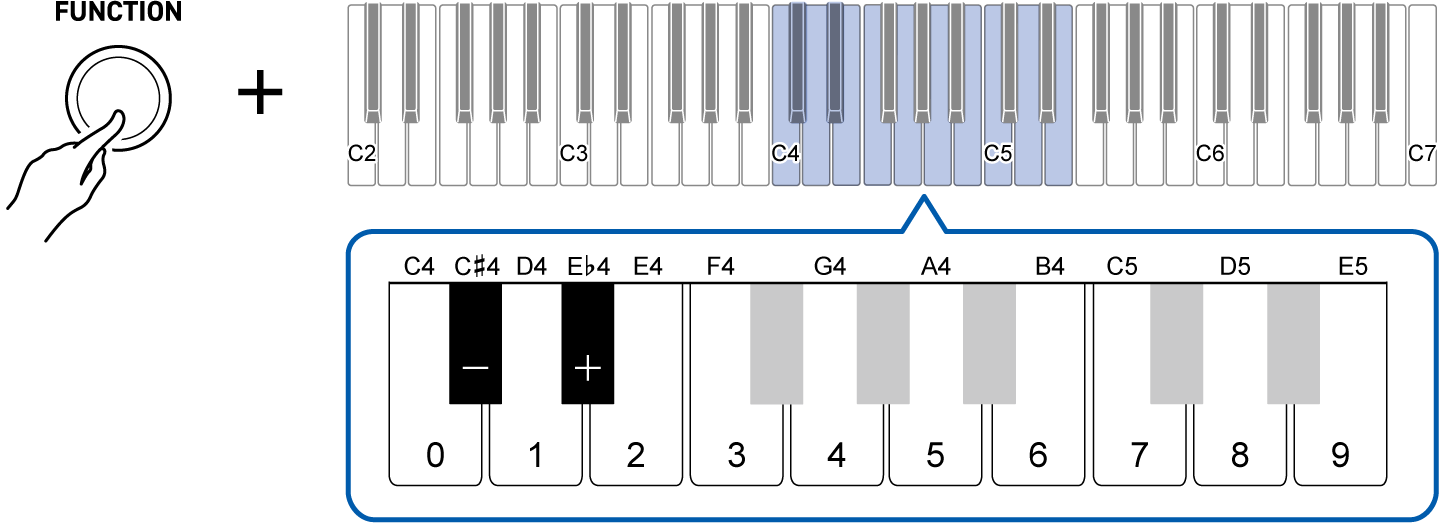
To do this:
Operate as follows:
Decrease frequency by 0.1 Hz
Press the C{4 (–) key.1
Increase frequency by 0.1 Hz
Press the E}4 (+) key.1
Input the frequency directly
Enter a four-digit value (no decimals) using the C4 (0) to E5 (9) keys.For 442.2 Hz, press “4-4-2-2”. The frequency changes when the fourth digit is entered.2
Restore the default value
Press the C{4 (–) key and the E}4 (+) key at the same time.
-
Press and hold to change the value continuously. Also, when the frequency reaches an integer (such as 440 or 441), a reference tone is played.
-
If you enter only three digits and release the FUNCTION button, the decimal value will be zero (e.g., if you press “4-4-2” and release the FUNCTION button, the frequency will be 442.0 Hz).
-
-
To exit the settings, release the FUNCTION button.