
Changing the Metronome Beat
The metronome beat on the Digital Keyboard can be set between 0 and 16 (default value: 4). The sound plays according to the setting, as shown in the table below.
|
Setting value |
Setting details |
|
0 |
Only a click sound is heard on every beat. |
|
1 |
A bell tone is heard on every beat. |
|
2–16 |
Sets the beat for beats 2 to 16. A bell tone sounds on the first beat, and a click sound is heard on each remaining beat. |
-
Press and hold the FUNCTION button, and press the D3 key.
-
Do not release the FUNCTION button until step 3.

-
-
Use the C4 to E5 keys to change the metronome beat setting.
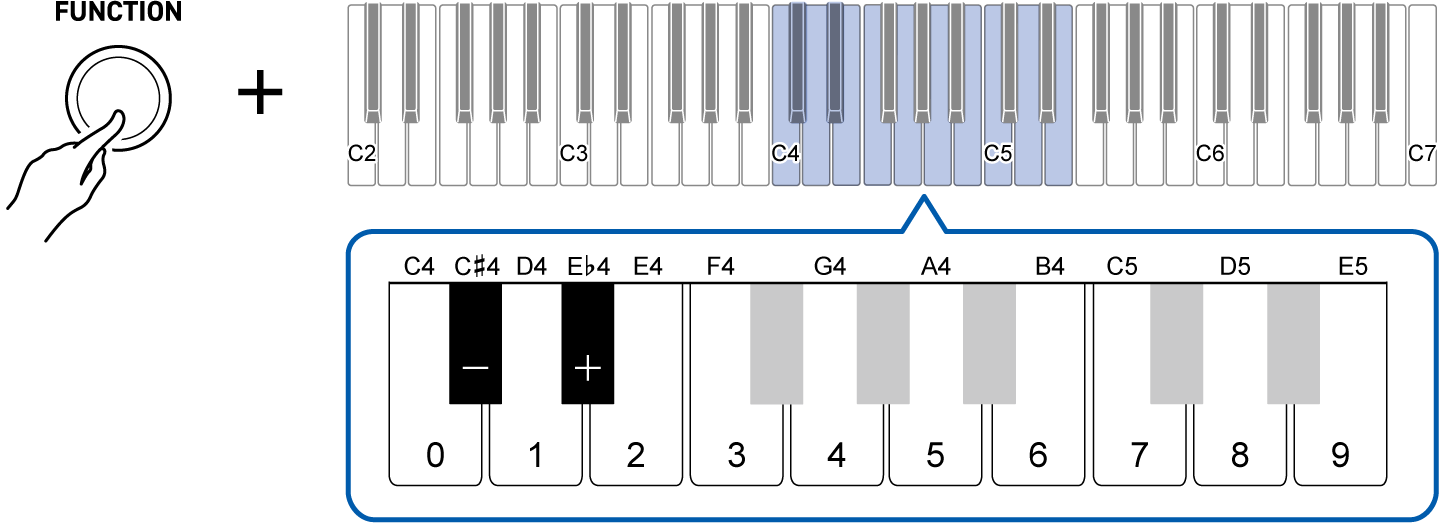
To do this:
Operate as follows:
Decrease the beat setting by 1
Press the C{4 (–) key.1
Raise the beat setting by 1
Press the E}4 (+) key.1
Directly input the beat setting
Use the C4 (0) to E5 (9) keys to enter a two-digit value.
For 3 beats, press “0-3”; for 12 beats, press “1-2”.
The setting changes when the second digit is entered.2
Restore the default value
Press the C{4 (–) key and the E}4 (+) key at the same time.
-
Press and hold to change the value continuously.
-
Even if you have only entered one digit, releasing the FUNCTION button will confirm the value already entered (e.g., if you press “5” and release the FUNCTION button, the value will be five beats).
-
-
To exit the settings, release the FUNCTION button.