
Changing the Metronome Volume
The metronome volume value can be set between 0 and 127 (default value: 110).
-
Press and hold the FUNCTION button, and press the F3 key.
-
Do not release the FUNCTION button until step 3.

-
-
Use the C4 to E5 keys to change the volume setting.
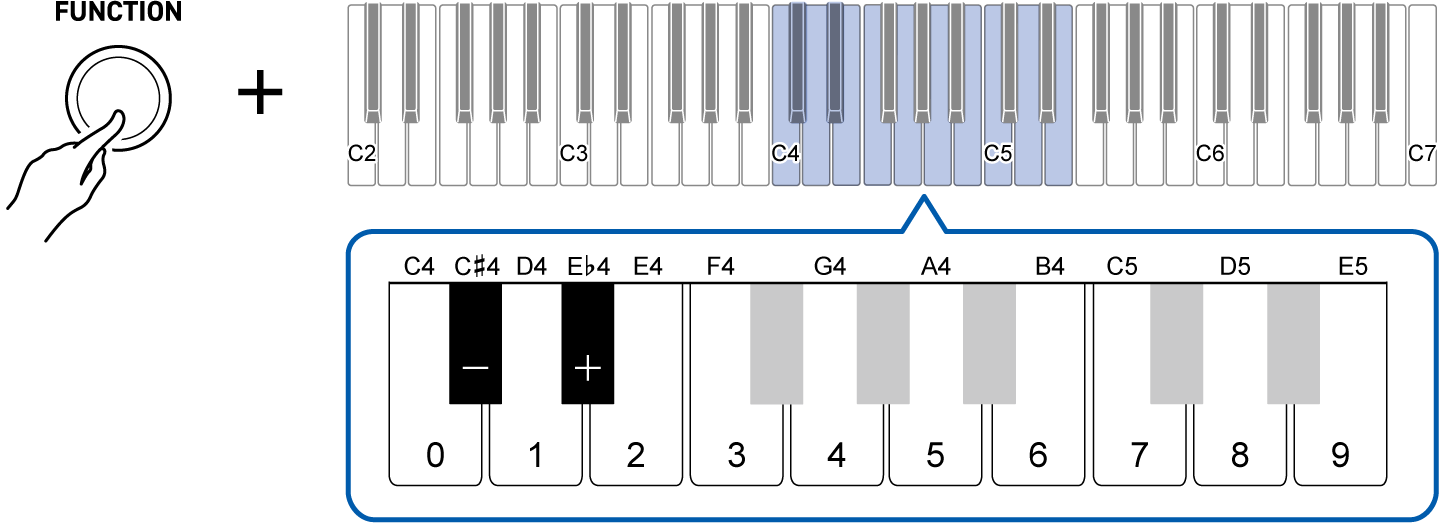
To do this:
Operate as follows:
Lower the volume setting by 1
Press the C{4 (–) key.1
Raise the volume setting by 1
Press the E}4 (+) key.1
Directly input the volume setting
Use the C4 (0) to E5 (9) keys to enter a three-digit value.For 20, press “0-2-0”. For 120, press “1-2-0”. The volume setting changes when the third digit is entered.2
Restore the default value
Press the C{4 (–) key and the E}4 (+) key at the same time.
-
Press and hold to change the value continuously.
-
Even if you have only entered two digits or less, releasing the FUNCTION button will confirm the value already entered (e.g., if you press “1-2” and then release the FUNCTION button, the volume value will be 12).
-
-
To exit the settings, release the FUNCTION button.