
Changing the Touch Response Settings
The Digital Keyboard has a Touch Response function that changes the volume according to how hard (fast) you press the keys. This function lets you play with dynamic expression, like playing an acoustic piano. The Digital Keyboard lets you change the sensitivity of the Touch Response, or adjust the volume when the Touch Response is turned off (which makes the sound play at the same volume, regardless of how hard you press the keyboard).
Changing the sensitivity of Touch Response
The Touch Response sensitivity can be selected from four levels.
-
Press and hold the FUNCTION button, and press the A5 key.
-
Do not release the FUNCTION button until step 2.

-
Each press of the A5 key changes the setting in the order shown in the table below. A notification tone signals which setting you have switched to after you press a key.
Notification tone
Setting
Details
Low note plays once
Off
The volume does not change according to the strength of the key press.
High note plays once
Light
The sound will be louder than normal and the keys will feel lighter.
High note plays twice
Normal (default setting)
The standard setting.
High note plays three times
Heavy
The sound will be softer than normal, and the keys will feel heavier.
-
-
To exit the settings, release the FUNCTION button.
Adjusting volume when Touch Response is off (touch off velocity)
If you turn off the Touch Response setting by following the steps in “Changing the sensitivity of Touch Response”, the sound will play at a constant volume regardless of how hard you press the keys. The volume (touch off velocity) at this time can be adjusted. The touch off velocity value can be set between 1 and 127 (default value: 100).
-
Press and hold the FUNCTION button, and press the B5 key.
-
Do not release the FUNCTION button until step 3.

-
-
Use the C4 to E5 keys to change the volume setting.
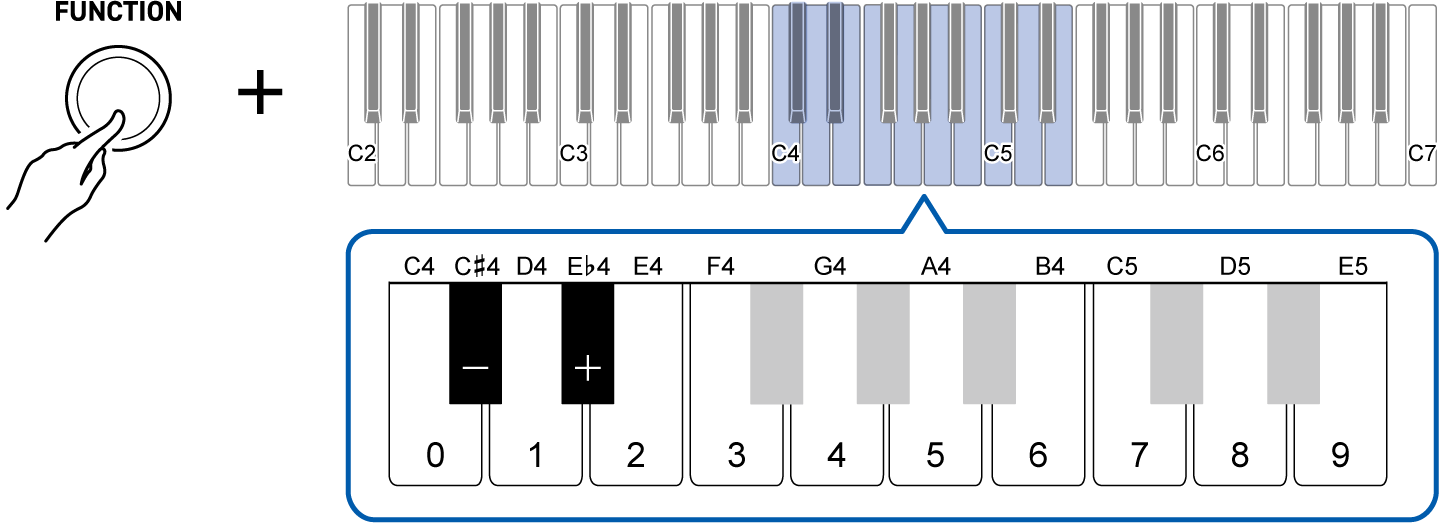
To do this:
Operate as follows:
Lower the volume setting by 1
Press the C{4 (–) key.1
Raise the volume setting by 1
Press the E}4 (+) key.1
Directly input the volume setting
Use the C4 (0) to E5 (9) keys to enter a three-digit value.For 20, press “0-2-0”. For 120, press “1-2-0”. The volume setting changes when the third digit is entered.2
Restore the default value
Press the C{4 (–) key and the E}4 (+) key at the same time.
-
Press and hold to change the value continuously.
-
Even if you have only entered two digits or less, releasing the FUNCTION button will confirm the value already entered (e.g., if you press “1-2” and release the FUNCTION button, the volume will be set to 12).
-
-
To exit the settings, release the FUNCTION button.