
Specifying a Port
After you use CASIO WATCHES to specify a port, you can use the watch to view the high tide information, Moon age, sunrise and sunset times, and other information for the port.
- Make sure that the
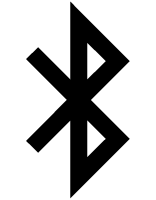 symbol is shown on the watch display when you perform the procedure below.
- If is not displayed, refer to the information at the link below.
-
1.
 Tap the “CASIO WATCHES” icon.
 -
2.
Tap the “My Watch” tab. -
3.
Select “GBX-100” and tap it. -
4.
Select the setting you want to change and then perform the operation shown on the screen.
 Top of page