
Using Sound Mode Effects (Hall Simulator/Reverb and Surround)
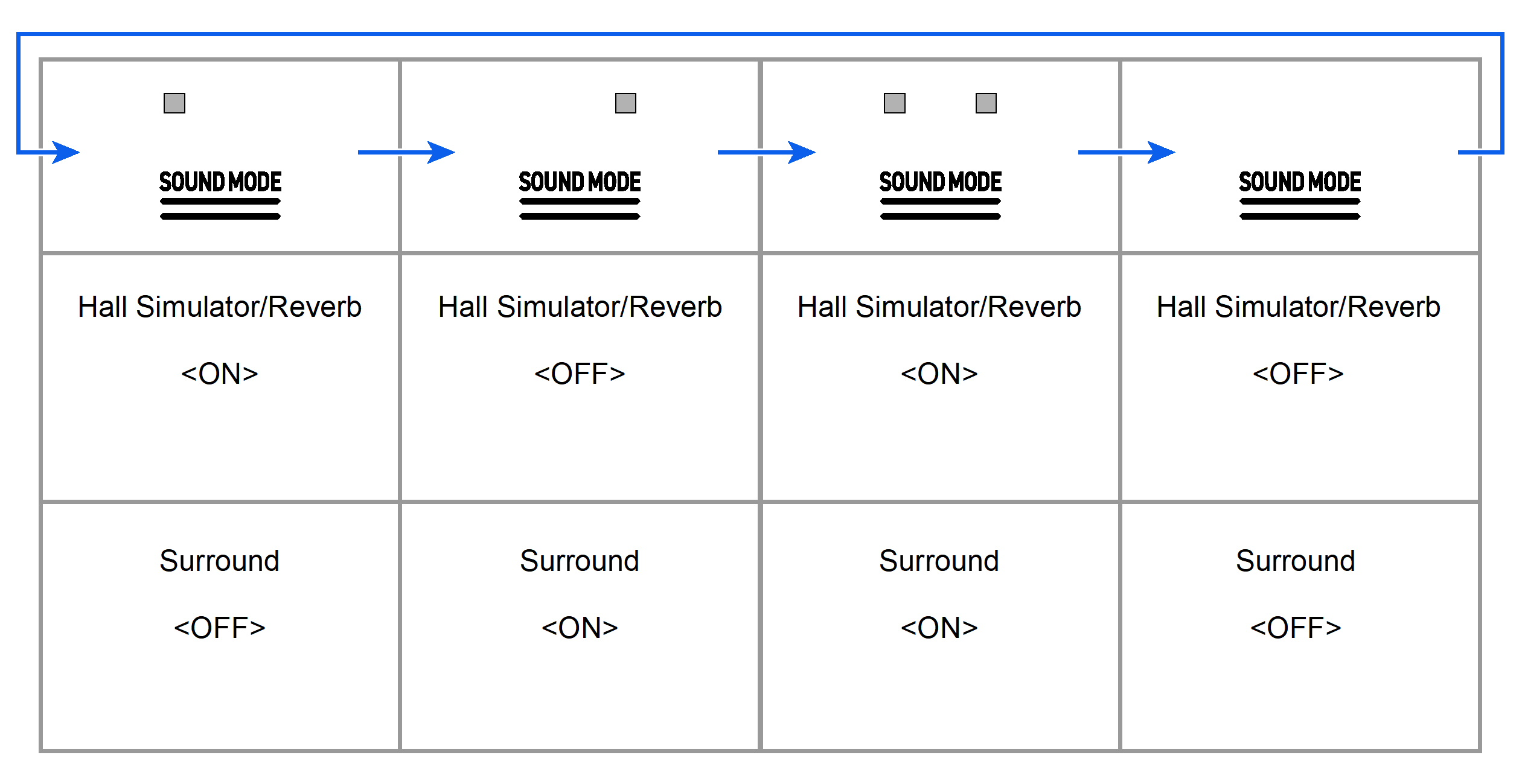
Each time the “SOUND MODE” button is touched, effects are switched on and off in turn.
Hall Simulator/Reverb
This effect adds reverberation to the sound.
Hall Simulator
This effect simulates the different acoustic characteristics of world-famous concert halls and buildings.
Reverb
This reproduces the reverberation of a given space, such as a room or a hall.
Surround
Surround sound (spread effect) is applied to the output sound from the Digital Piano speakers.
Turning on/off Hall Simulator/Reverb and Surround
-
Touch the “SOUND MODE” button.
-
Each time you touch the button, the indicators above the button will become lit or unlit as shown below.
-
Selecting Hall Simulator/Reverb Presets
-
While holding down the “SOUND MODE” button, press any one of the A0 to E1 keys.
Selecting a Setting Value Directly (operation type A)

-
Default value: Hall
Hall Simulator
|
Key |
Type |
Setting Details |
|
A0 |
N.Y. Club |
Music club in Manhattan |
|
B}0 |
Opera Hall |
The uniquely shaped Sydney concert hall |
|
B0 |
Berlin Hall |
An arena-style classical concert hall in Berlin |
|
C1 |
British Stadium |
Large outdoor stadium in the outskirts of London |
Reverb
|
Key |
Type |
Setting Details |
|
C{1 |
Room |
Reverb that gives a sense of reverberation within a room |
|
D1 |
Large Room |
|
|
E}1 |
Hall |
Reverb that emulates reverberation in a small hall |
|
E1 |
Stadium |
Reverb that emulates reverberation within a stadium |
Adjusting Applied Hall Simulator/Reverb
-
While holding down the “SOUND MODE” button, press the corresponding key.
Using the +/– Keys to Raise or Lower the Setting Value by 1 (operation type B)

-
Setting value: 0 (no effect) to 42 (maximum depth)
A separator tone sounds when the set value becomes a multiple of 10.
|
Key |
Setting |
|
D2 |
Reduces the depth of effect applied to built-in sound sources by 1 (–) |
|
E}2 |
Increases the depth of effect applied to built-in sound sources by 1 (+) |
|
D2+E}2 |
Resets the depth of effect to the default setting for built-in sound sources (default value: 21) |
|
E2 |
Decreases the depth of effect on the wireless audio input signal by 1 (–) |
|
F2 |
Increases the depth of effect on the wireless audio input signal by 1 (+) |
|
E2+F2 |
Resets the depth of effect to the default setting for the wireless audio input signal (default value: 0) |