
Gʼz EYE App Top Screen
Starting up the Gʼz EYE app will display the top screen shown below.
Top Screen
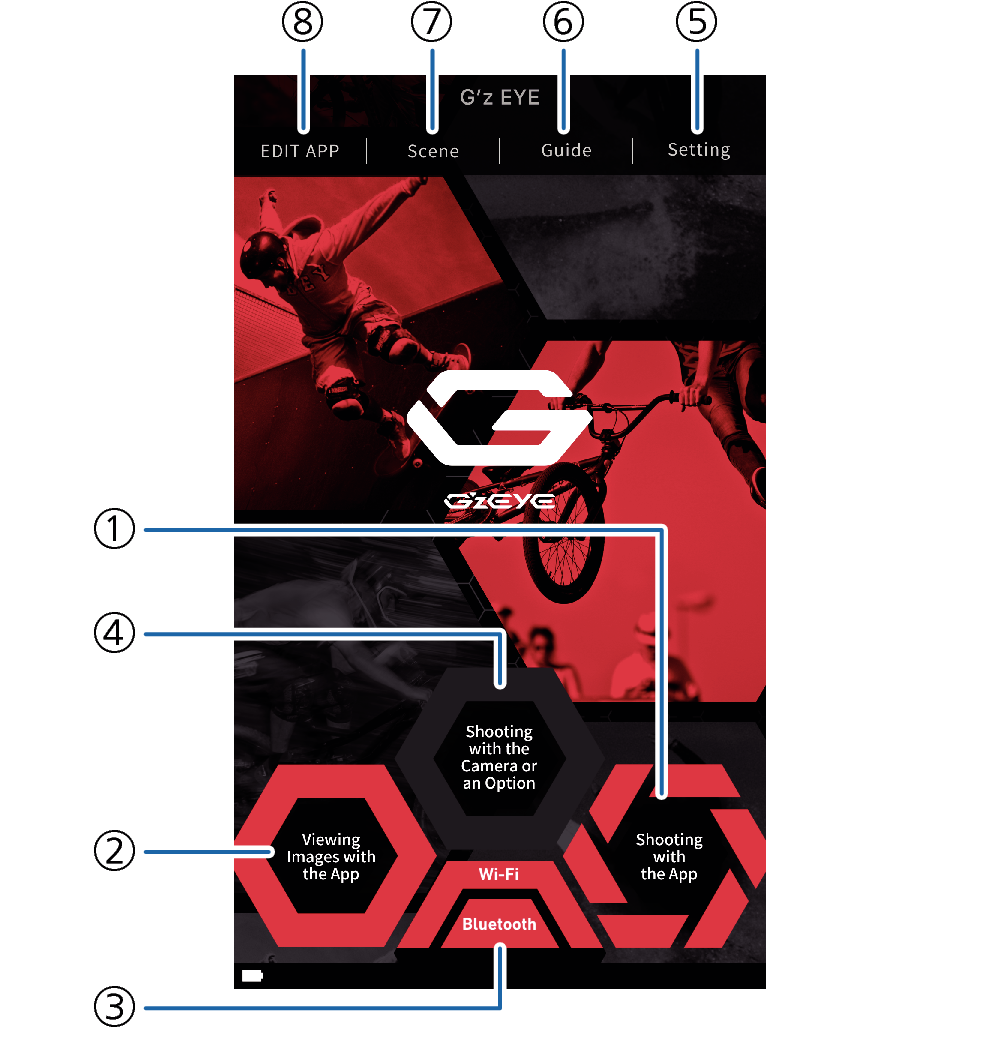
- ①
-
Shooting with the App
Tap to enable remote control of camera shooting from a smartphone.
- ②
-
Viewing Images with the App
Tap to view images stored in camera memory and send them to a smartphone.
- ③
-
Connection status
Shows the status of the connection between the camera and smartphone. Tapping here toggles the camera and smartphone between connected and disconnected.
- ④
-
Shooting with the Camera or an Option
Tap when you want to shoot with the camera or an optional controller.
- ⑤
-
Setting
Tap to configure settings of the Gʼz EYE app, camera, etc.
- ⑥
-
Guide
Tap to display the Gʼz EYE app user’s guide.
- ⑦
-
Scene
Start up the Scene app
- ⑧
-
EDIT APP
Tap to start up a movie editing app.
 Top of page