Other Settings
This section explains other watch settings you can configure.
Enabling the Button Operation Tone
Use the procedure below to enable or disable the tone that sounds when you press a button.
-
Enter the Timekeeping Mode.
-
Hold down (A) for at least two seconds.
-
Use (A) and (C) to move the pointer to [BEEP].
-
Press (B).
-
Use (A) and (C) to move the pointer to [OPERATION].
-
Press (B).
-
Use (A) and (C) to move the pointer to [ON] (enabled) or [OFF] (disabled).
-
Press (B) to complete the setting operation.
-
Press (D) twice to exit the setting screen.
This displays the Timekeeping Mode setting screen.
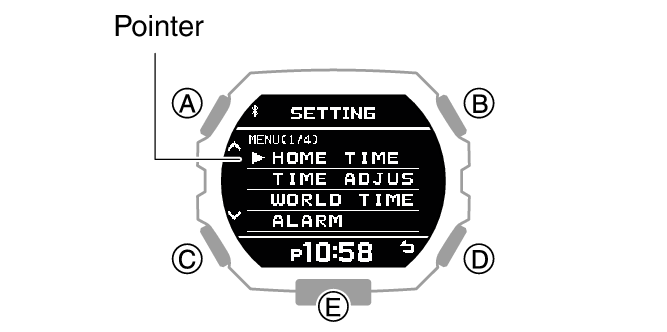
After the setting operation is complete, [SETTING COMPLETED] will appear for a few seconds, and then the BEEP (sound) setting screen will re-appear.
 is displayed in the Timekeeping Mode while the operation tone is disabled.
Note
The watch exits the setting operation automatically after about two or three minutes of non-operation.
Configuring Notification Sound Settings
You can use the procedure below to enable or disable the notification sound.
-
Enter the Timekeeping Mode.
-
Hold down (A) for at least two seconds.
-
Use (A) and (C) to move the pointer to [BEEP].
-
Press (B).
-
Use (A) and (C) to move the pointer to [NOTIFICATION].
-
Press (B).
-
Use (A) and (C) to select a notification sound ON/OFF setting.
-
Press (B) to complete the setting operation.
-
Press (D) twice to exit the setting screen.
This displays the Timekeeping Mode setting screen.
|
[ALL ON] |
Enables sound for all notifications. |
|
[USER] |
Enables sound only for items specified by you. |
|
[ALL OFF] |
Disables sound for all notifications. |
Note
The configuration of [USER] notifications can be changed using CASIO WATCHES.
After the setting operation is complete, [SETTING COMPLETED] will appear for a few seconds, and then the BEEP (sound) setting screen will re-appear.
is displayed in the Timekeeping Mode while the notification tone is disabled.
Note
The watch exits the setting operation automatically after about two or three minutes of non-operation.
Configuring Vibration Settings
In addition to operation sounds and notification sounds, your watch also uses vibration for alerts. You can use the procedure below to enable or disable vibration.
The  icon is shown on the Timekeeping Mode display while operation vibration or notification vibration is enabled.
Configuring Operation Vibration Settings
-
Enter the Timekeeping Mode.
-
Hold down (A) for at least two seconds.
-
Use (A) and (C) to move the pointer to [VIBRATION].
-
Press (B).
-
Use (A) and (C) to move the pointer to [OPERATION].
-
Press (B).
-
Use (A) and (C) to enable or disable operation vibration.
-
Press (B).
-
Press (D) twice to exit the setting screen.
This displays the Timekeeping Mode setting screen.
|
[ON] |
Enables operation vibration. |
|
[OFF] |
Disables operation vibration. |
After the setting operation is complete, [SETTING COMPLETED] will appear for a few seconds, and then the vibration setting selection screen will re-appear.
Note
The watch exits the setting operation automatically after about two or three minutes of non-operation.
Configuring Notification Vibration Settings
-
Enter the Timekeeping Mode.
-
Hold down (A) for at least two seconds.
-
Use (A) and (C) to move the pointer to [VIBRATION].
-
Press (B).
-
Use (A) and (C) to move the pointer to [NOTIFICATION].
-
Press (B).
-
Use (A) and (C) to select a notification vibration ON/OFF setting.
-
Press (B).
-
Press (D) twice to exit the setting screen.
This displays the Timekeeping Mode setting screen.
|
[ALL ON] |
Enables vibration for all notifications. |
|
[USER] |
Enables vibration only for items specified by you. |
|
[ALL OFF] |
Disables vibration for all notifications. |
Note
The configuration of [USER] notifications can be changed using CASIO WATCHES.
After the setting operation is complete, [SETTING COMPLETED] will appear for a few seconds, and then the vibration setting selection screen will re-appear.
Note
The watch exits the setting operation automatically after about two or three minutes of non-operation.
Specifying the Height and Weight Units
You can specify the units of measurement used for height and weight.
You can select either centimeters (cm) or feet (ft) as the height unit.
You can select either kilograms (kg) or pounds (lb) as the weight unit.
Important!
When Tokyo (TOKYO) is the Home City, the height unit is fixed as centimeters (cm) and the weight unit is fixed as kilograms (kg), and these settings cannot be changed.
-
Enter the Timekeeping Mode.
-
Hold down (A) for at least two seconds.
-
Use (A) and (C) to move the pointer to [UNIT].
-
Press (B).
-
Use (A) and (C) to select the unit setting item.
-
Press (B).
-
Use (A) and (C) to select the unit you want.
-
Press (B) to complete the setting operation.
-
Press (D) twice to exit the setting screen.
This displays the Timekeeping Mode setting screen.
|
[HEIGHT] |
Height unit |
|
[WEIGHT] |
Weight unit |
Height
|
[CENTIMETER] |
Centimeters |
|
[FEET] |
Feet |
Weight
|
[KILOGRAM] |
Kilograms |
|
[POUND] |
Pounds |
After the setting operation is complete, [SETTING COMPLETED] will appear for a few seconds, and then the unit setting screen will re-appear.
Note
The watch exits the setting operation automatically after about two or three minutes of non-operation.
Specifying the Calorie Display Unit
You can select either calories (cal) or joules (J) as the calories burned unit.
Important!
When Tokyo (TOKYO) is the Home City, the unit is fixed as calories (cal) and cannot be changed.
-
Enter the Timekeeping Mode.
-
Hold down (A) for at least two seconds.
-
Use (A) and (C) to move the pointer to [UNIT].
-
Press (B).
-
Use (A) and (C) to move the pointer to [CALORIES].
-
Press (B).
-
Use (A) and (C) to select the calorie unit you want.
-
Press (B) to complete the setting operation.
-
Press (D) twice to exit the setting screen.
This displays the Timekeeping Mode setting screen.
|
[CALORIE] |
Calories |
|
[JOULE] |
Joules |
After the setting operation is complete, [SETTING COMPLETED] will appear for a few seconds, and then the unit setting screen will re-appear.
Note
The watch exits the setting operation automatically after about two or three minutes of non-operation.
Screen Off Function
To prevent screen burn in, this function turns off the display when the watch is removed from the wrist and not being used at the time of day specified with CASIO WATCHES.
Any one of the events below will turn the display back on.
Wearing the watch
Operating a button
Elapse of three hours
Note
CASIO WATCHES can be used to specify the screen off trigger time. Note that you cannot configure this setting using watch operations. The initial factory default setting is 2:00 a.m.
Resetting Watch Settings
This section explains how to return the watch settings below to their initial factory defaults.
Watch Settings
Stopwatch
Timer
Alarm
Profile
Important!
The watch cannot be reset while its Airplane Mode is enabled.
-
Enter the Timekeeping Mode.
-
Hold down (A) for at least two seconds.
-
Use (A) and (C) to move the pointer to [RESET ALL SETTINGS].
-
Press (B).
-
Use (A) and (C) to move the pointer to [EXECUTE].
-
Press (B).
-
Use (A) and (C) to move the pointer to [YES].
-
Press (B).
-
Press (A) to clear [AC] from the display.
This displays the Timekeeping Mode setting screen.
To cancel the reset operation, move the pointer to [CANCEL].
To stop the reset operation, move the pointer to [NO].
The watch will return to the Timekeeping Mode after the reset operation is complete. The reset operation is complete when [AC] appears in the lower right corner of the display.
Note
Resetting the watch also deletes information for pairing the watch with a phone, and unpair them.