Alarm
The watch performs a beep or vibration alert when an alarm time is reached. You can set up to four different alarms.
The sound and/or vibration alert operations will not be performed while battery power is low.
When snooze is enabled for an alarm, it sound every five minutes up to seven times.

Using the CASIO WATCHES Phone App to Configure Alarm Settings
If the watch is paired with a phone, you can also use the CASIO WATCHES phone app to set alarms.
Configuring Alarm Settings
-
Enter the Timekeeping Mode.
-
Hold down (A) for at least two seconds.
-
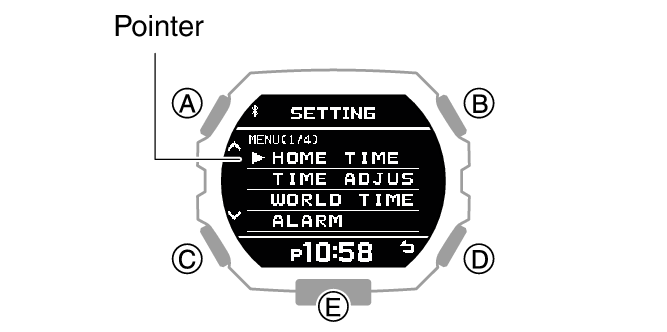
Use (A) and (C) to move the pointer to [ALARM].
-
Press (B).
-
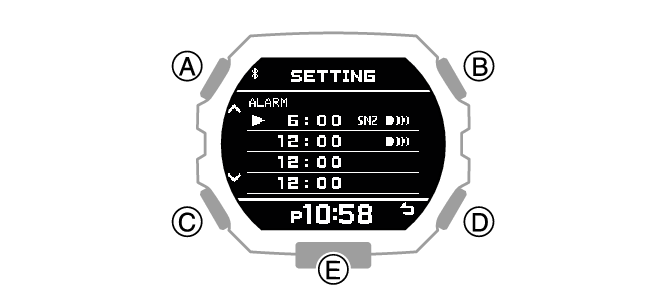
Use (A) and (C) to move the pointer to the alarm you want to set.
-
Press (B).
-
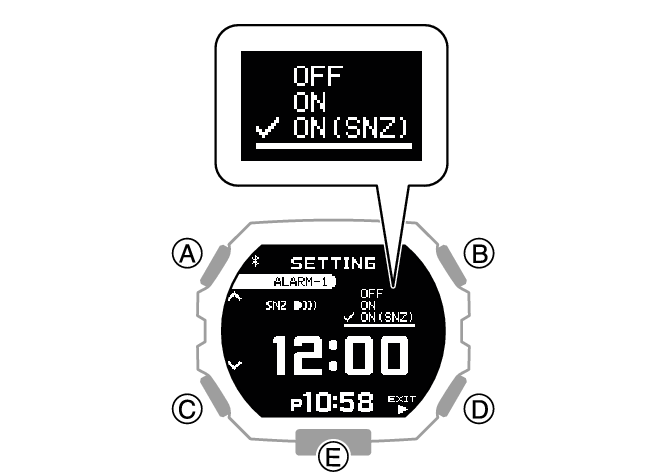
Use (A) and (C) to select an alarm and snooze function ON/OFF setting.
-
Press (B).
-
Use (A) and (C) to set the alarm hour.
-
Press (B).
-
Use (A) and (C) to set the alarm minute.
-
Press (B).
-
Use (A) and (C) to select whether or not you want to save your current settings.
-
Press (B) to complete the setting operation.
-
Press (D) twice to exit the setting screen.
This displays the Timekeeping Mode setting screen.
|
[OFF] |
Disables alarm, disables snooze |
|
[ON] |
Enables alarm, disables snooze |
|
[ON (SNZ)] |
Enables alarm, enables snooze |
The currently selected setting will be indicated by a check mark ( ) to the left.
|
[YES] |
Saves current settings. |
|
[NO] |
Discards current settings. |
|
[RETURN] |
Returns to the alarm setting screen. |
After the setting operation is complete, [SETTING COMPLETED] will appear for a few seconds, and then the alarm setting selection screen will re-appear.
Turning on an alarm causes  to appear on the display to the right of the time setting. If snooze is enabled, [SNZ] also appears.
Note
To exit the alarm setting operation at any point, press (D) and advance to step 13.
The watch exits the setting operation automatically after about two or three minutes of non-operation.
To stop a sounding alarm
While an alarm sound and/or vibration operation is being performed, press any button to stop it.
Note
When snooze is enabled for an alarm, alarm sound and/or vibration will repeat every five minutes, up to seven times. To stop an alarm’s ongoing snooze operation, turn off the alarm.
Turning Off an Alarm
To stop an alarm sound and/or vibration operation, perform the steps below to turn it off.
To reactivate an alarm sound and/or vibration operation, turn it back on.
Note
An indicators is displayed while any one of the alarms is turned on.
The alarm indicator is not displayed while all of the alarms are turned off.

-
Enter the Timekeeping Mode.
-
Hold down (A) for at least two seconds.
-
Use (A) and (C) to move the pointer to [ALARM].
-
Press (B).
-
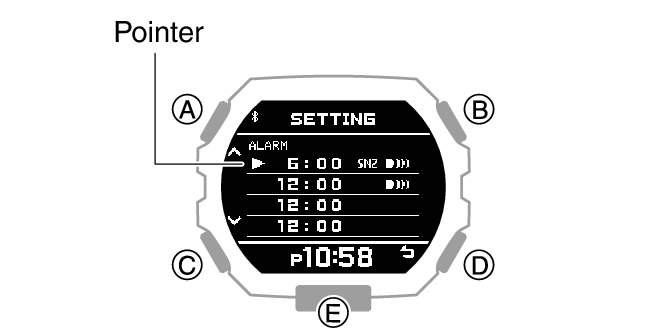
Use (A) and (C) to move the pointer to the alarm you want to turn off.
-
Press (B).
-
Use (A) and (C) to select [OFF].
-
Press (D).
-
Use (A) and (C) to select whether or not you want to save your current settings.
-
Press (B) to complete the setting operation.
-
Press (D) twice to exit the setting screen.
This displays the Timekeeping Mode setting screen.
|
[YES] |
Saves current settings. |
|
[NO] |
Discards current settings. |
|
[RETURN] |
Returns to the alarm setting screen. |
After the setting operation is complete, [SETTING COMPLETED] will appear for a few seconds, and then the alarm setting selection screen will re-appear.
Turning off all alarms will cause (alarm) to disappear from the display.

Note
If (alarm) is still displayed, it means that at least one of the other alarms is still turned on. To turn off all of the alarms repeat steps 5 through 10 until the (alarm) indicator is no longer displayed.