Receiving Phone Notifications
You can use your watch to check the details of incoming calls, mail, and SNS alerts and information that are received by a phone connected to the watch by Bluetooth. The watch can have up to 10 notifications stored in its memory.
To receive notifications from your phone, you need to pair the watch with it.
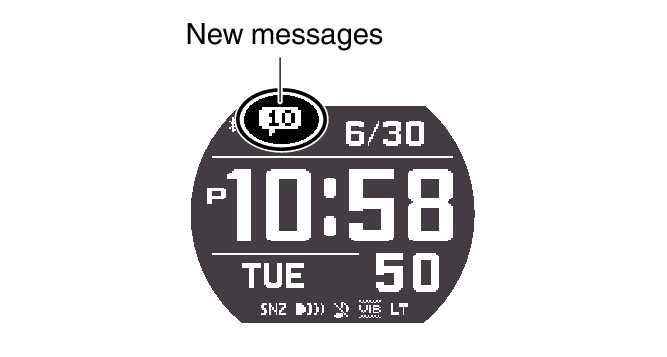
The number of new messages is shown on the Timekeeping Mode display.
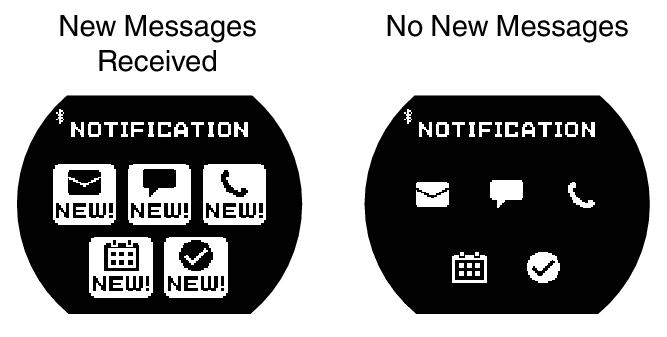
You can use the Notification Mode to check notification types and whether there are any new messages.
|
This indicator: |
Means this: |
 |
|
 |
SNS |
 |
Incoming calls, missed calls |
 |
Schedule |
 |
Other |
While notification receive is enabled, reception of a notification causes its contents to appear on the display, regardless of the mode (Notification Cut-in).
Note
The watch automatically returns from the Notification Mode to the Timekeeping Mode if you do not perform any Notification Mode operation for about two or three minutes.
Enabling and Disabling Incoming Call Notifications
You can enable or disable notification receive as required.
-
Enter the Notification Mode.
-
Press (B).
-
Hold down (A) for at least two seconds.
-
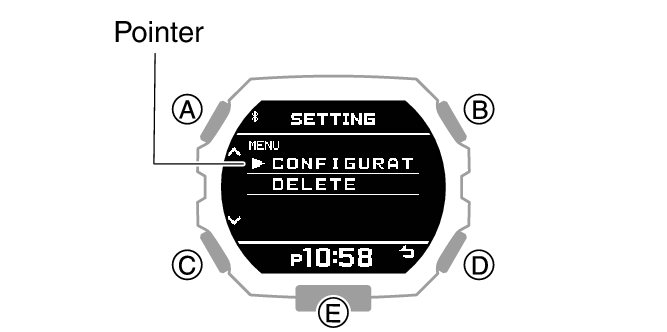
Use (A) and (C) to move the pointer to [CONFIGURATION].
-
Press (B).
-
Use (A) and (C) to select a notification receive ON/OFF setting.
-
Press (B) to complete the setting operation.
-
Press (D) to exit the setting screen.
This displays the notification list.
This displays the Notification Mode setting screen.
|
[ON] |
Enables receive and notification cut-in display. |
|
[ON (RUN OFF)] |
Disables receive during run timing only. |
|
[OFF] |
Disables receive and notification cut-in display. |
Notification cut-in displays the contents of a received notification, regardless of the watch mode.
After about 30 seconds, the display will return to what it was before the notification cut-in appeared.
After the setting operation is complete, [SETTING COMPLETED] will appear for a few seconds, and then the Notification Mode setting screen will re-appear.
Displaying Notification Contents
-
Enter the Notification Mode.
-
Press (B).
-
Use (A) and (C) to move the pointer to the title of the notification you want to view.
-
Press (B).
This displays the notification list.
The notification list can contain up to 10 notifications.
Addition of a notification to the list when it already contains 10 notifications, will cause the oldest notification in the list to be deleted to make room for the new one.
This displays the details of the notification. From 83 to 100 double-width characters are displayed for the body text.
You can use (A) and (C) to scroll.
To return to the notification list, press (D).
To return to the Timekeeping Mode, hold down (C) for at least one second.
Deleting a Notification
Deleting a Particular Notification
-
Enter the Notification Mode.
-
Press (B).
-
Use (A) and (C) to move the pointer to the title of the notification you want to delete.
-
Hold down (A) for at least two seconds.
-
Use (A) and (C) to move the pointer to [DELETE].
-
Press (B).
-
Use (A) and (C) to move the pointer to [ONE].
-
Press (B).
-
Use (A) and (C) to move the pointer to [EXECUTE].
-
Press (B).
This displays the notification list.
This displays the Notification Mode setting screen.
To cancel data deletion, move the pointer to [CANCEL].
After the data delete operation is complete, [DELETE COMPLETED] will appear for a few seconds, and then the Notification Mode screen will re-appear.
Deleting All Notifications
-
Enter the Notification Mode.
-
Press (B).
-
Hold down (A) for at least two seconds.
-
Use (A) and (C) to move the pointer to [DELETE].
-
Press (B).
-
Use (A) and (C) to move the pointer to [ALL].
-
Press (B).
-
Use (A) and (C) to move the pointer to [EXECUTE].
-
Press (B).
-
Use (A) and (C) to move the pointer to [YES].
-
Press (B).
This displays the notification list.
This displays the Notification Mode setting screen.
To cancel data deletion, move the pointer to [CANCEL].
This displays a confirmation screen.
After the data delete operation is complete, [DELETE COMPLETED] will appear for a few seconds, and then the Notification Mode screen will re-appear.