Barometric Pressure Measurement
You can use the Barometer Mode to take a reading of the barometric pressure at your current location, and to track reading changes and trends.
Important!
Check the information at the link below to find out how to ensure correct readings.
Checking the Current Barometric Pressure
-
Enter the Barometer Mode.
Entering the Barometer Mode starts measurement, and displays the barometric pressure at your current location and a barometric pressure graph.
After you enter the Barometer Mode, the watch takes readings about every five seconds for three minutes. After that, a measurement is taken about every two minutes.
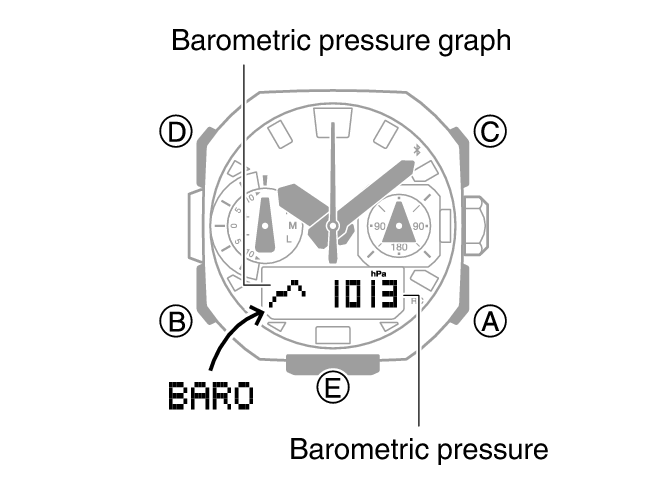
To retrigger measurement, press (A).
To return to the Timekeeping Mode, hold down (B) for at least two seconds.
Note
If the hour and/or minute hand is located over the digital display when you perform a barometric pressure measurement, the hands will temporarily shift to the 22-second or 38-second position to allow easier reading of measurement values. The hands will unshift to their normal positions after about three seconds.
When you enter the Barometer Mode, the function hand indicates the barometric pressure difference if the previous barometric pressure measurement was retained.
The watch will automatically return to the Timekeeping Mode from the Barometer mode if you do not perform any operation for about one hour.
The measurement range is 260 hPa to 1,100 hPa (7.65 inHg to 32.45 inHg) (1 hPa (0.05 inHg) units). [- - -] will appear for the measured value if it is outside the allowable range.
Checking Changes in Barometric Pressure Over Time
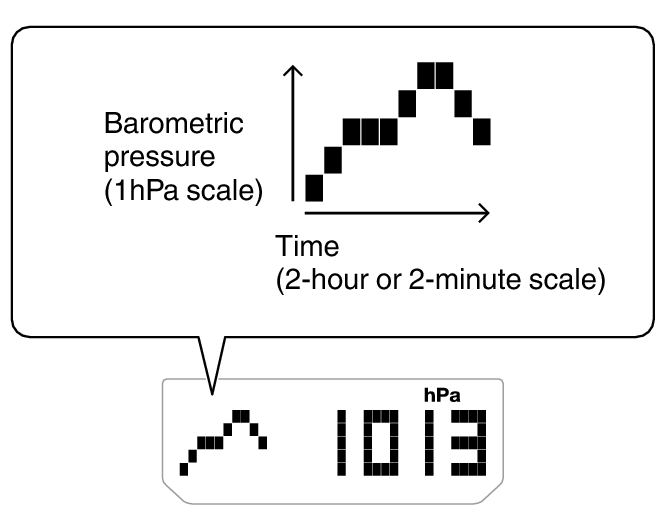
The watch can be configured to show a graph of pressure readings taken every two hours or every two minutes.
You can display a graph of barometric pressure readings for the past 20 hours or the past 20 minutes. The square ( ) at the far right of the graph indicates the latest barometric pressure reading.
Changing the Measurement Interval of the Barometric Pressure Graph
You can select a measurement interval of two hours or two minutes for the barometric pressure graph.
-
Enter the Barometer Mode.
-
Loosen the crown and then pull it out.
-
Press (B).
-
Rotate the crown to select [0:02] or [2:00] as the measurement interval.
-
Push the crown back in and then lock it.
This displays the current barometric pressure.
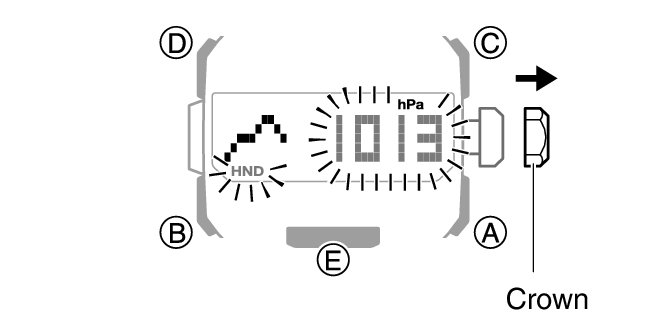
This causes the current measurement interval to appear on the display.
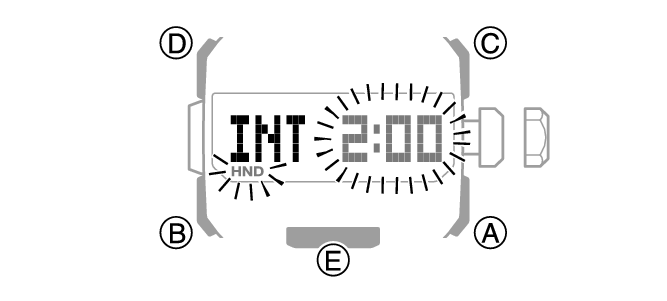
[0:02]: When the measurement interval of the barometric pressure graph is two minutes, measurements are taken every five seconds.
[2:00]: When the measurement interval of the barometric pressure graph is two hours, measurements are taken every two minutes.
Note
If you switch to the two-minute measurement interval graph, the watch will automatically return to the two-hour measurement interval graph after 24 hours.
Note that the graph will not be displayed immediately after it is switched to a two-minute measurement interval graph.
Predicting Upcoming Weather
|
A trend like this: |
Means this: |
|---|---|
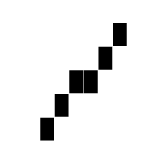 |
Rising barometric pressure, which indicates that upcoming weather probably will be fair. |
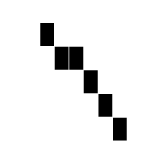 |
Falling barometric pressure, which indicates that upcoming weather probably will be bad. |
Note
Large changes in barometric pressure and/or temperature can cause past data readings to be plotted outside of the visible area of the graph. Though plots are not visible, the data is still maintained in watch memory.
The barometric pressure graph is not displayed while Barometric Pressure Change Indications are displayed.
Checking the Change in Barometric Pressure between Two Readings
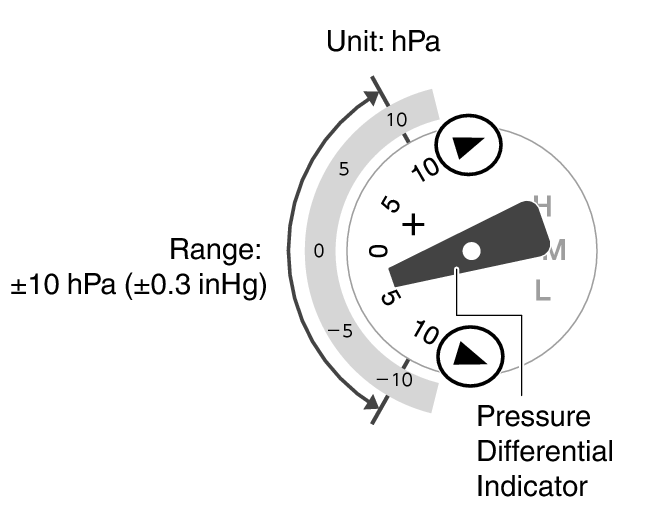
When you perform the procedure below in the Barometer Mode, the function hand will indicate the difference between the current barometric pressure measurement and the last auto measurement value (taken at two-hour or two-minute intervals).
-
Enter the Barometer Mode.
The function hand indicates the barometric pressure differential (Barometric Pressure Differential Indicator).
Example: Barometric pressure differential of -3 hPa (-0.09 inHg) (two-hour measurement interval)
Note
The function hand points to  (over) if the current barometric pressure differential is greater than +10 hPa (0.3 inHg), or
  (under) if it is less than -10 hPa (-0.3 inHg).
A reading outside the allowable measurement range of 260 hPa to 1,100 hPa (7.65 inHg to 32.45 inHg) or any measurement error will cause the function hand to point to [0].
Sudden Barometric Pressure Change Indications
Whenever the watch detects a significant change in air pressure readings (due to sudden ascent or descent, or to the passage of a low pressure or high pressure area), it will beep to let you know. An arrow will also flash on the display at this time if the watch is in the Barometer Mode, or if it is in the Timekeeping Mode with the barometric pressure graph displayed. The arrow that appears shows the direction of the pressure change. These alerts are called “Barometric Pressure Change Indications”.
|
This indication: |
Means this: |
|---|---|
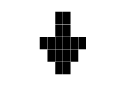 |
Sudden drop in pressure |
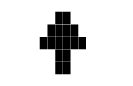 |
Sudden rise in pressure |
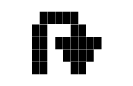 |
Sustained rise in pressure, shifting to a fall |
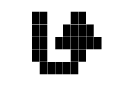 |
Sustained fall in pressure, shifting to a rise |
Important!
To ensure correct barometric pressure change indication operation, enable it in a location where the altitude is constant (such as a lodge, camp area, or on the ocean).
A change in altitude causes a change in air pressure. Because of this, correct readings are impossible. Do not take readings while ascending or descending a mountain, etc.
-
Enter the Barometer Mode.
-
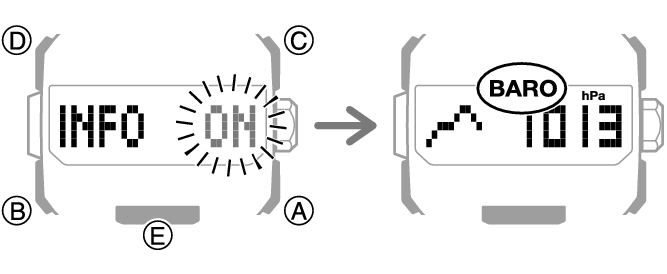
Hold down (D) for at least two seconds.
-
To disable barometric pressure change indication, hold down (D) again for at least two seconds.
If this turns on barometric pressure change indication, [INFO ON] will stop flashing and then the [BARO] indicator will appear on the display.
Note
If Barometric Pressure Change Indications are on, barometric pressure readings are taken every two minutes even while the watch is not in the Barometer Mode.
The barometric pressure change indication becomes disabled automatically 24 hours after it is enabled.
You will not be able to turn on barometric pressure change indication if the watch’s battery level is low.
Low battery power will also cause barometric pressure change indication to turn off automatically.
Calibrating Barometric Pressure Readings (Offset)
The watch’s pressure sensor is adjusted at the factory and normally does not require calibration. However, you can calibrate the displayed value if you notice major errors in readings.
Important!
The watch will not be able to produce correct barometric pressure readings if you make a mistake during the calibration procedure. Check to make sure that the value you use for calibration produces correct pressure readings.
-
Enter the Barometer Mode.
-
Loosen the crown and then pull it out.
-
Rotate the crown to change the value.
-
Push the crown back in and then lock it.
This displays the current barometric pressure and enters the Barometric Pressure Offset Mode.
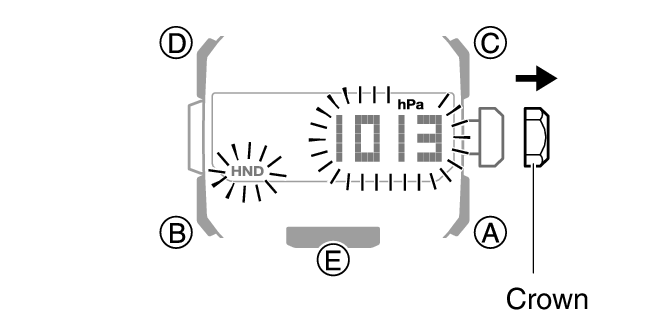
Setting range: 260 to 1,100 hPa (or 7.65 inHg to 32.45 inHg)
Setting unit: 1 hPa (or 0.05 inHg)
To return the barometric pressure setting to its initial factory default, press (A) and (C) at the same time.
Note
If you do not perform any operation for about two minutes after pulling out the crown, crown operations will automatically become disabled. If that happens, push the crown back in and then pull it out again.
Specifying the Barometric Pressure Unit
You can specify either hectopascals (hPa) or inches of mercury (inHg) as the display unit for barometric pressure values.
Important!
When Tokyo (TYO) is the Home City, the barometric pressure unit is fixed as hectopascals (hPa) and cannot be changed.
-
Enter the Timekeeping Mode.
-
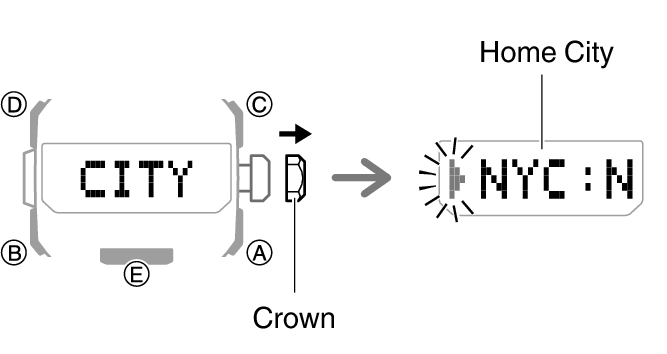
Loosen the crown and then pull it out.
-
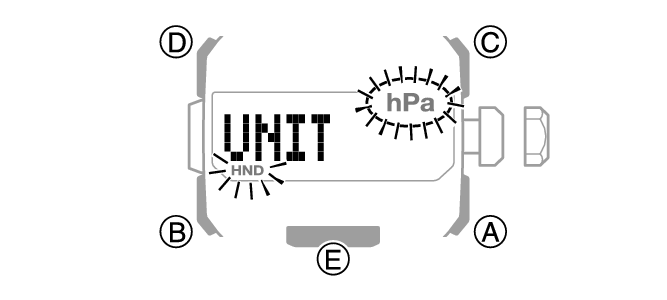
Press (B) eight times.
-
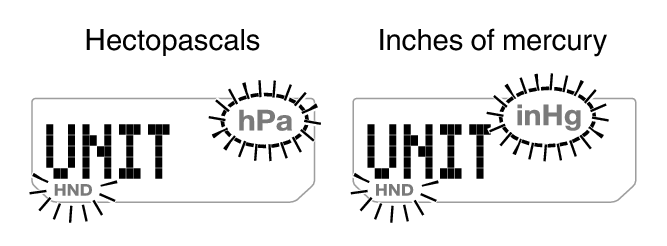
Rotate the crown to select a barometric pressure unit.
-
Push the crown back in and then lock it.
The currently selected Home City will appear on the display.
This causes [UNIT] to appear, with [hPa] or [inHg] flashing.
[hPa]: Hectopascals
[inHg]: Inches of mercury
Note
If you do not perform any operation for about two minutes after pulling out the crown, crown operations will automatically become disabled. If that happens, push the crown back in and then pull it out again.
Barometric Pressure Reading Precautions
The barometric pressure graph produced by this watch can be used to obtain an idea of upcoming weather conditions. However, this watch should not be used in place of precision instruments required for official weather prediction and reporting.
Pressure sensor readings can be affected by sudden changes in temperature. Because of this, there may be some error in the readings produced by the watch.