
Watch Face and Display Indicators
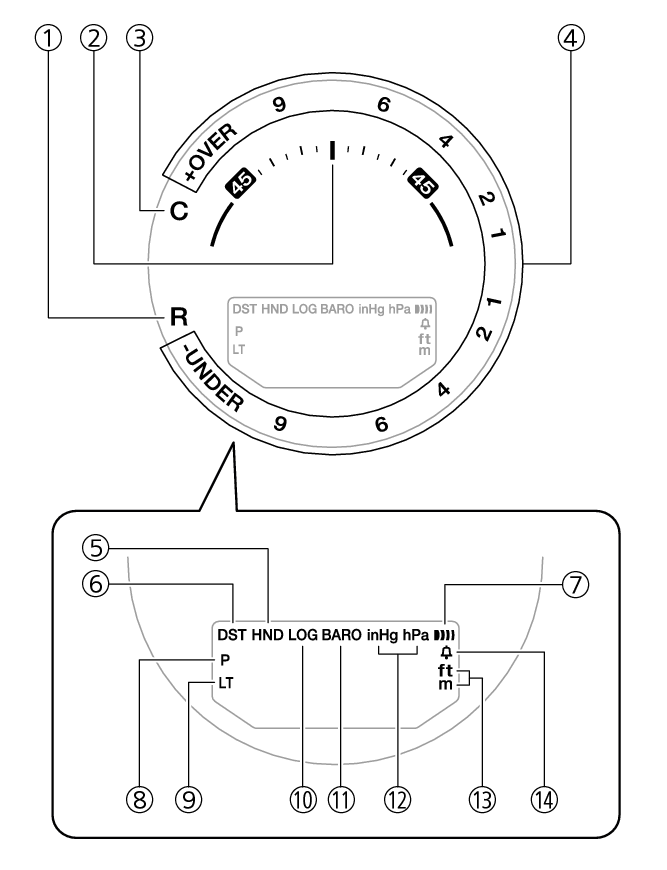
- ①
-
The second hand points to [R] when the watch is standing by for connection with a phone.
- ②
-
With 12 o’clock as the reference point, the second hand indicates either north (compass reading) or the approximate angle differential from your current location to a destination (Location Indicator).
- ③
-
The second hand points to [C] when the watch is connected with a phone.
- ④
-
The second hand indicates altitude/barometric pressure differential.
- ⑤
-
Flashes while the watch’s hands are shifted for easier reading.
- ⑥
-
Displayed when the indicated time is summer time.
- ⑦
-
Displayed when an alarm is turned on.
- ⑧
-
Displayed during p.m. times while 12-hour timekeeping is being used.
- ⑨
-
Displayed while Auto Light is enabled.
- ⑩
-
Displayed while Route Log is enabled.
- ⑪
-
Displayed while barometric pressure trend information is enabled.
- ⑫
-
Shows the barometric pressure measurement unit.
- ⑬
-
Shows the altitude and distance measurement unit.
- ⑭
-
Appears when the hourly time signal is on.
Battery Replacement
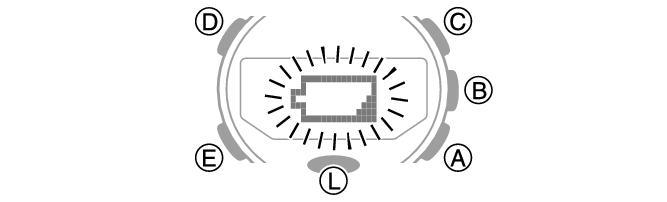
When battery power goes low,  will start to flash and some functions will become disabled. If continues to flash, replace the battery.
Request battery replacement from a CASIO service center or your original retailer.
 Top of page