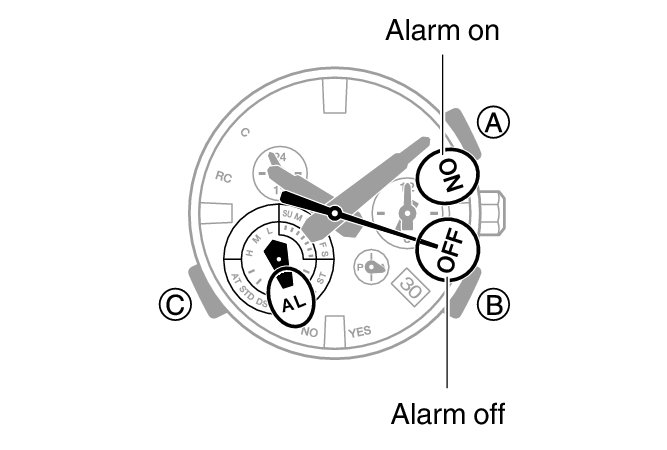
Alarm
The watch will beep when the alarm time is reached.
The beeper is muted in the cases described below.

Using the CASIO WATCHES Phone App to Configure Alarm Settings
If the watch is paired with a phone, you can also use the CASIO WATCHES phone app to set alarms.
Configuring Alarm Settings
-
Enter the Alarm Mode.
-
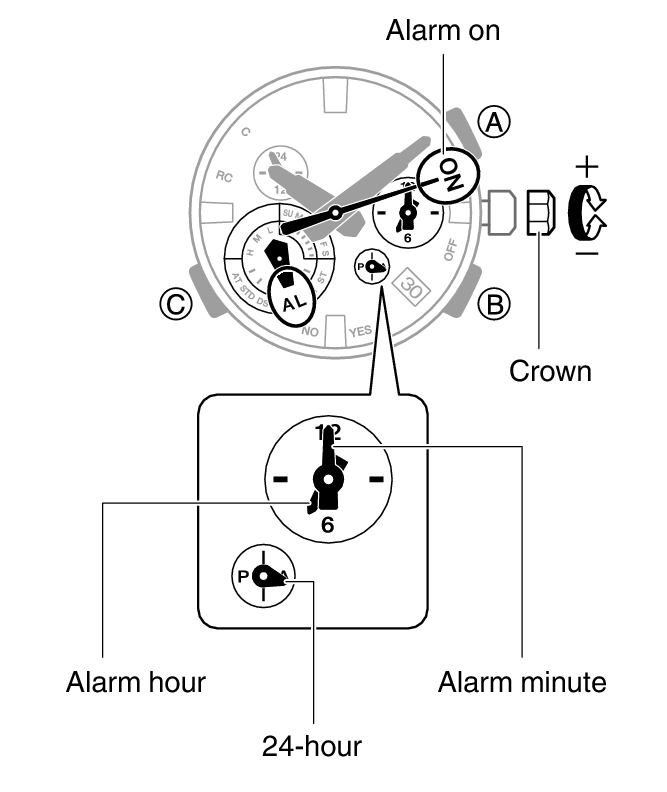
Pull out the crown to the first click.
-
Rotate the crown to change the alarm time setting.
-
Push the crown back in.
This turns on the alarm.
Note
A beeper sounds for 10 seconds when an alarm time is reached.
The watch will automatically return from the Alarm Mode to the Calendar Mode if you do not perform any operation for about two or three minutes.
To stop the alarm
To stop the alarm after it starts to sound when an alarm time is reached, press any button.
Turning Off the Alarm
To stop the alarm from sounding, perform the steps below to turn it off.
To have the alarm sound again, turn it on.
-
Enter the Alarm Mode.
-
Press (B) to move the second hand to OFF.
Each press of (B) toggles between on and off.