
Adjusting Hand and Day Indicator Alignment
If the hands and/or date indicator are out of alignment even though auto time adjustment is being performed, use CASIO WATCHES to adjust them.
-
1.
 On the Home Screen, tap the “CASIO WATCHES” icon.
 -
2.
 Hold down (C) for about two seconds.
 -
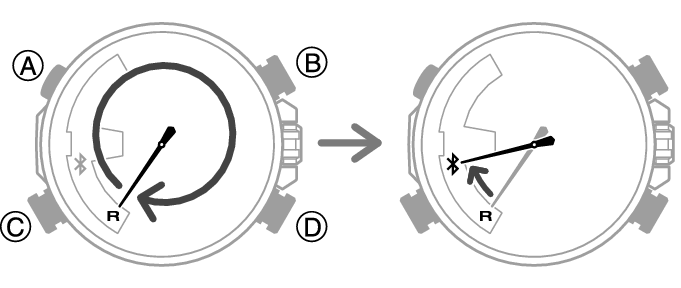
- The second hand will move to [R]. Keep (C) depressed until the second hand starts moving again and completes one full revolution, stopping again at [R].
- The second hand will move from [R] to
 when a connection is established between the watch and phone.
-
3.
Perform the operation shown on the phone screen to correct hand and day indicator alignment.
 Top of page