Initial Time Adjustment
When using the watch for the first time, we recommend connection of the watch to a smartphone for current time setting is recommended.
Connecting the Watch with a Smartphone to Set the Watch’s Current Time
Once the watch is paired with a smartphone, its current time setting automatically synchronizes with that of the watch. Perform the steps below to pair the watch with a phone.
 Install the app on your phone.
 Configure Bluetooth settings.
 Pair the watch with a phone.
Install the app on your phone.
To use the watch with a phone, first tap one of the links below and install the “CASIO WATCHES” app on the phone.
Important!
To pair the watch, you must first install the “CASIO WATCHES” app and log in with a CASIO ID. If you already have a CASIO ID, use it to log in. If you do not have a CASIO ID, follow the on-screen instructions to register a new one and then use it to log in.
Configure Bluetooth settings.
Enable the phone’s Bluetooth.
Note
For details about setting procedures, see your phone documentation.
Pair the watch with a phone.
-
Move the phone to be paired with close to (within one meter of) the watch.
-
 Tap the “CASIO WATCHES” icon.
 -
 Hold down (C) for at least three seconds. Release the button when
  and [CONNECT WITH A PHONE] start to flash.
 -
Perform the operation shown on the screen of the phone to be paired with.
Tap  on the “My Watch” tab. Next, select the applicable product name.
When a connection is established between the watch and phone, and [CONNECT WITH A PHONE] stop flashing.
At this time the time settings of your phone and watch sync with each other.
If pairing fails for some reason, [ERR] appears on the display momentarily and then the watch returns to the Timekeeping Mode. Perform the pairing procedure again from the beginning.
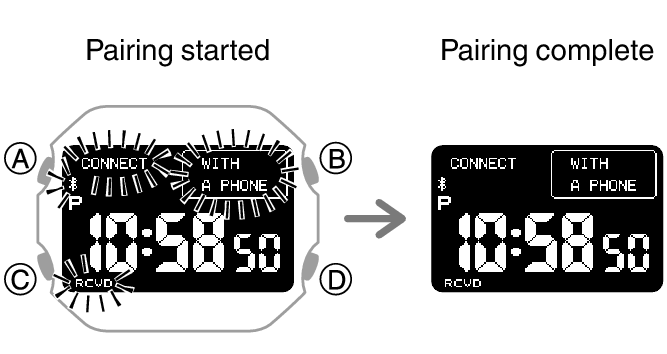
This completes the pairing operation.
Once paired, the smartphone and watch automatically connect to synchronize the watch’s time setting with that of the smartphone.
Note
The first time you start up the CASIO WATCHES phone app, a message will appear on your phone asking if you want to enable location information acquisition. Configure settings to allow background use of location information.
Other Ways to Adjust the Current Time Setting
In addition to connecting with a smartphone, you can also use the procedures described below to adjust the watch’s current time setting.