Hand and Day Indicator Alignment
Strong magnetism or impact can cause the hands and/or the day indicator to go out of alignment. If this happens, correct hand and day indicator alignment.
Correcting Hand and Day Indicator Alignment
-
Enter the Timekeeping Mode.
-
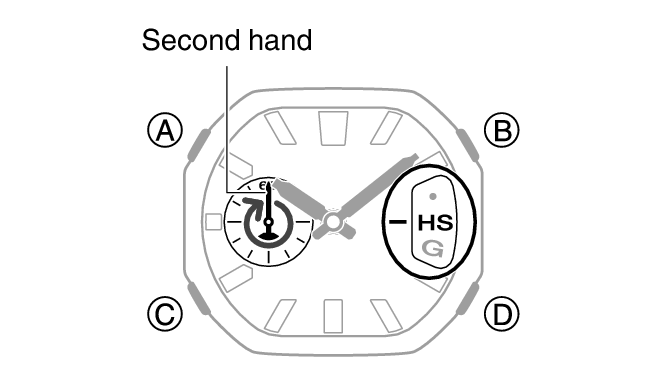
Hold down (A) for at least five seconds. Release the button after the second hand completes one full rotation.
-
Use (B) and (D) to align the second hand with the 0-second position.
-
Press (C).
-
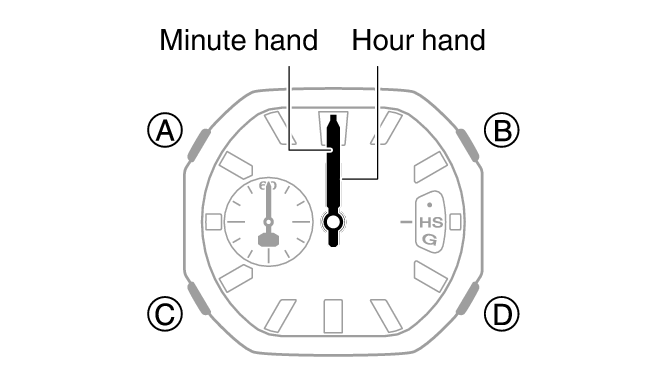
Use (B) and (D) to align the hour hand and minute hand with the 12 o’clock position.
-
Press (C).
-
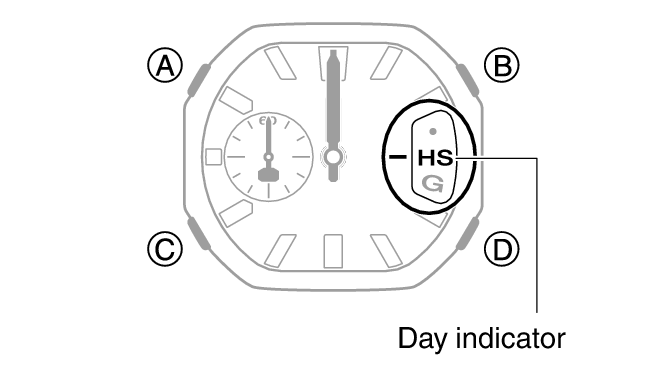
Use (B) and (D) to center [HS] in the date window.
-
Press (A).
This enables adjustment of second hand alignment.
This enables adjustment of hour and minute hand alignment.
This enables adjustment of day indicator alignment.
Note
While the setting is being configured, the watch will exit the setting operation automatically after about two or three minutes of non-operation.