
Watch Face and Display Indicators
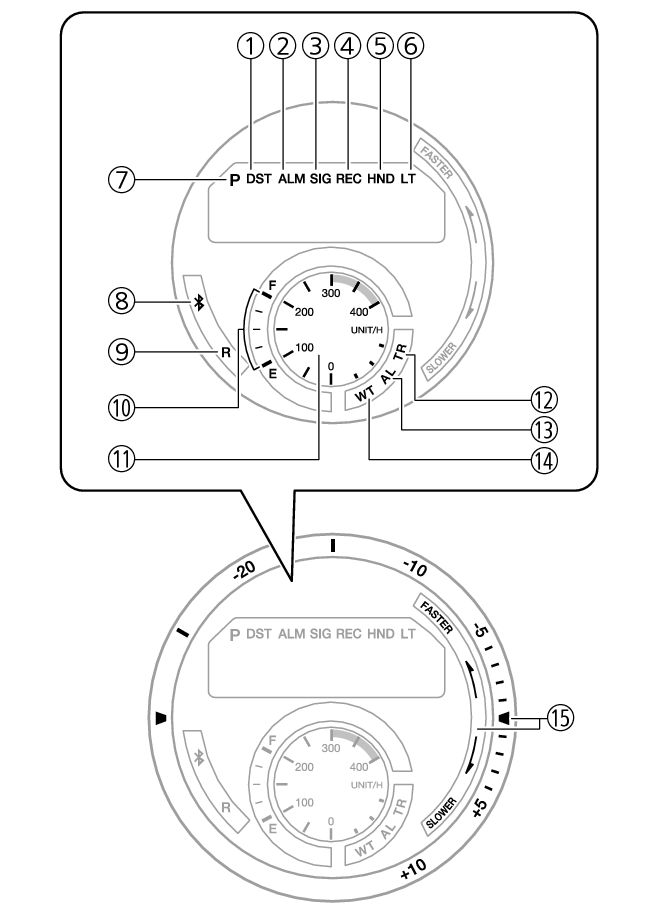
- ①
-
Displayed while the watch is indicating summer time.
- ②
-
Displayed while an alarm is turned on.
- ③
-
Displayed while the hourly time signal is enabled.
- ④
-
Displayed while in the Recall Mode.
- ⑤
-
Displayed while the watch’s hands are shifted for easier reading.
- ⑥
-
Displayed while Auto Light is enabled.
- ⑦
-
Displayed during p.m. times while 12-hour timekeeping is being used.
- ⑧
-
When the watch is connected with a phone, the second hand points to
 .
- ⑨
-
When the watch is standing by for connection with a phone, the second hand points to [R].
- ⑩
-
Battery level
In the Timekeeping Mode, the current charge level is indicated by the mode hand. - ⑪
-
In the Stopwatch Mode, the mode hand indicates the average speed of the lap being timed.
- ⑫
-
In the Timer Mode, the mode hand points to [TR].
- ⑬
-
In the Alarm Mode, the mode hand points to [AL].
- ⑭
-
In the World Time Mode, the mode hand points to [WT].
- ⑮
-
After you measure a lap time, the second hand indicates the difference between it and the target time in this area.
 Top of page
