
Specifying a World Time City
Use the procedure in this section to select a World Time city. If you are in an area that observes summer time, you can also enable or disable summer time.
-
1.Pull out the crown to the first click.
-
The second hand will point to the time zone of the current World Time City.
- You can find out the availability of World Time location information by checking the day of the week hand.
“P”: Available
“N”: Not available
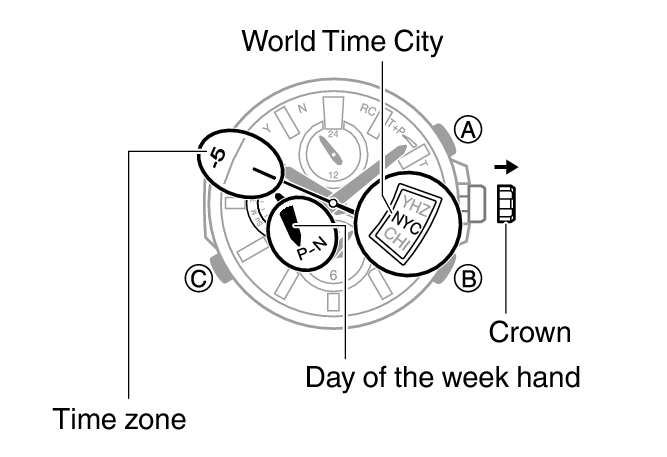
- You can find out the availability of World Time location information by checking the day of the week hand.
-
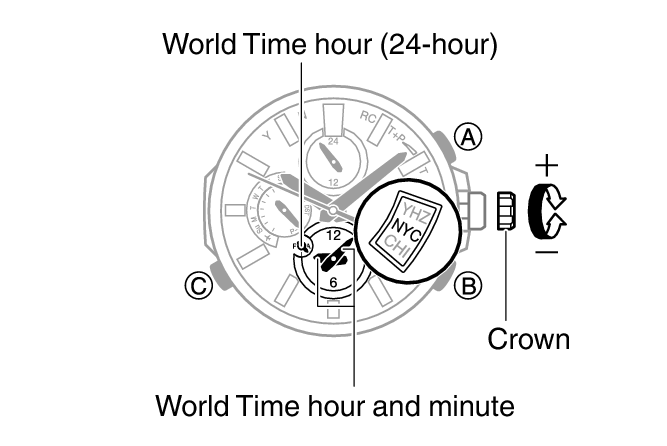
2.Rotate the crown to change the World Time City.
-
The small hour and minute hands will indicate the current time in the World Time city you selected.
- Pressing (A) will cause the day of the week hand to move to the current summer time setting.
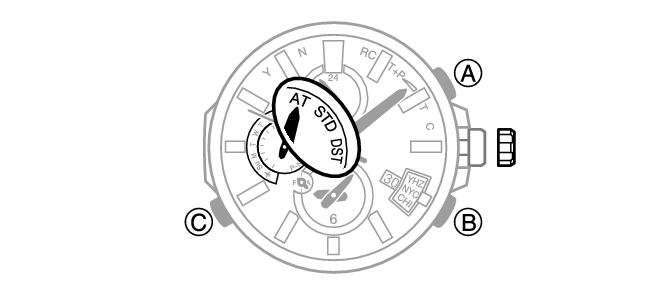
- “AT (AUTO)”
The watch switches between standard time and summer time automatically.
- “STD”
The watch always indicates standard time.
- “DST”
The watch always indicates summer time.
-
3.Hold down (A) for about one second to change the summer time setting.
-
- Each time you hold down (A) for about one second, the summer time setting will cycle to the next available option.
-
4.Push the crown back in.
 Top of page