

Unpairing
To unpair the watch from a phone, delete the pairing information from CASIO WATCH+, the phone, and the watch.
Deleting Pairing Information from CASIO WATCH+
-
1.
 If the watch is connected with a phone, press (C) to terminate the connection.
 -
2.
 On the Home Screen, tap the “CASIO WATCH+” icon.
 -
3.
Tap the CASIO WATCH+  icon.
icon. -
4.
In the “Previously registered watch” list, tap the watch you want to unpair. -
5.
Tap “Delete pairing registration”. -
6.
Perform the operation shown on the phone screen.
Deleting Pairing Information from a Phone
-
1.
On the Home Screen, tap “Settings”  “Bluetooth”.
 -
2.
Tap  next to “CASIO EQB-500”.
 -
3.
Tap “Forget this Device”. -
4.
Tap “Forget Device”. -
This deletes the watch’s pairing information from the phone.
-
1.
On the App screen tap: “Settings” “Bluetooth”. -
2.
Tap next to “CASIO EQB-500”. -
3.
Tap “Unpair”. -
This deletes the watch’s pairing information from the phone.
-
4.
Scroll the status bar downwards and open the notification panel. -
5.
Tap  (Bluetooth) to disable Bluetooth, and then re-enable it.
Deleting Pairing Information from the Watch
-
1.
Pull out the crown to the second click. -
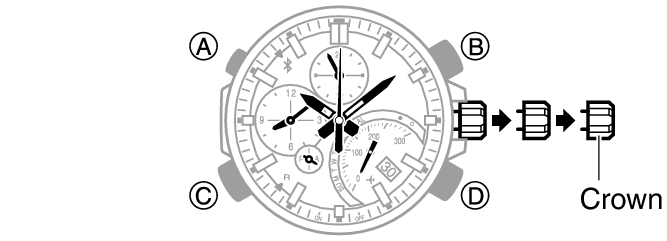
-
2.
Hold down (D) for about 5 seconds. -
This causes the second hand to perform one revolution and deletes the pairing information.
-
3.
Push the crown back in.
