Almanac (Sunrise and Sunset Times, and Moon Age)
You can view the sunrise/sunset times and moon age for a location acquired via smartphone connection or GPS reception, for a Home City specified manually, or for a port specified with Tide function.

Checking Sunrise and Sunset Times, and Moon Age
-
Display the current time screen.
-
Use (A) and (D) to select [ALMANAC].
-
Press (C).
-
Use (A) and (D) to select the day.
-
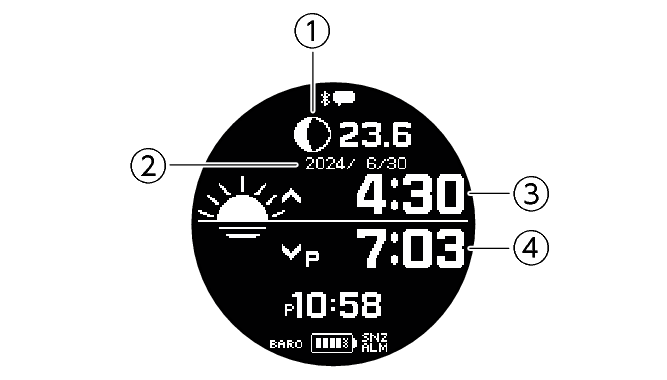
Moon Graph + Moon Age
-
Day
-
Sunrise time
-
Sunset time

This displays the sunrise and sunset times, and the Moon age.
Note
Sunrise and sunset times are calculated internally by the watch. Calculation results may contain errors, with greater errors occurring at higher latitudes.
[--:--] is displayed when calculation results cannot be output for some reason or in regions outside of 65.0° south to 65.0° north latitude.
If you do not perform any operation for two or three minutes while the Almanac screen is displayed, the watch automatically returns to the current time screen.
Interpreting the Moon Graph and Moon Age Indicator
|
Moon phase |
Moon age |
This indicator: |
|
New Moon |
0.0 to 0.9 |
 |
|
|
1.0 to 2.7 |
 |
|
|
2.8 to 4.6 |
 |
|
|
4.7 to 6.4 |
 |
|
First Quarter |
6.5 to 8.3 |
 |
|
|
8.4 to 10.1 |
 |
|
|
10.2 to 12.0 |
 |
|
|
12.1 to 13.8 |
 |
|
Full Moon |
13.9 to 15.7 |
 |
|
|
15.8 to 17.5 |
 |
|
|
17.6 to 19.4 |
 |
|
|
19.5 to 21.2 |
 |
|
Last Quarter |
21.3 to 23.1 |
 |
|
|
23.2 to 24.9 |
 |
|
|
25.0 to 26.8 |
 |
|
|
26.9 to 28.6 |
 |
The indicators in the above table show approximate phase forms when facing south to look up at the Moon in the Northern Hemisphere.
They are intended only to indicate whether the Moon's left or right side is darkened, and the Moon's actual appearance may be different. Also, in the Southern Hemisphere or near the equator, the Moon will appear in the northern sky, so the light and dark portions of the Moon will be opposite those shown by the watch’s indicator.
Specifying a Location to Look Up Its Sunrise/Sunset Times and Moon Age
-
Display the current time screen.
-
Use (A) and (D) to select [ALMANAC].
-
Press (C).
-
Hold down (A) for at least two seconds.
-
Press (C).
-
Use (A) and (D) to move the pointer to the location whose almanac you want to view.
-
Press (C) to complete the setting operation.
This displays the almanac setting screen.
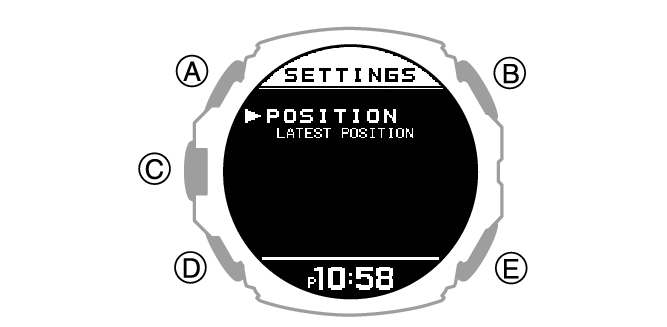
|
[LATEST POSITION] |
Use any one of the sources below to configure the latest location setting. |
|
Location information obtained by GPS signal reception. |
|
|
Location information obtained by Bluetooth connection. |
|
|
Manually configured Home City setting. |
|
|
[SAME AS TIDE SETTINGS] |
Specifies the same location as the Tide Graph setting. |
After the setting operation is complete, a checkmark appears for a few seconds, and then the almanac setting screen re-appears.
Note
If you do not perform any operation for two or three minutes while the Almanac screen is displayed, the watch automatically returns to the current time screen.