
Connecting with a Phone
To connect the watch with a phone, first install the CASIO “G-SHOCK Connected” app on the phone and then use Bluetooth to pair the watch with the phone.
 Install the app on your phone.
Depending on your phone type, tap one of the links below to install G-SHOCK Connected.
iOS (iPhone) Users
https://itunes.apple.com/us/app/g-shock-connected/id1179983841?mt=8
AndroidTM (GALAXY, etc.) Users
https://play.google.com/store/apps/details?id=com.casio.gshockconnected
 Configure Bluetooth settings.
Enable the phone’s Bluetooth.
 Pair the watch with a phone.
Before you can use the watch in combination with a phone, you first need to pair them.
-
1.Move the phone to be paired with close to (within one meter of) the watch.
-
2.On the phone’s Home Screen, tap the “G-SHOCK Connected” icon.
-
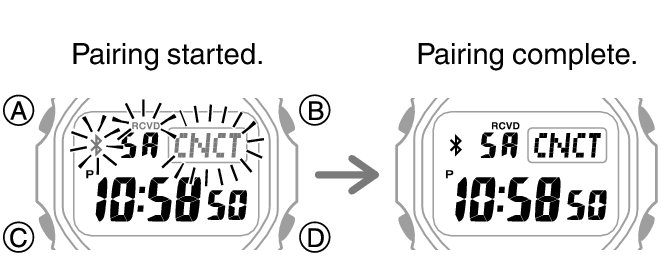
3.Follow the instructions on the phone’s screen to pair with the watch.
-
- If a pairing prompt message appears, perform the operation shown on the phone screen.
- If pairing fails for some reason, [NG] will appear on the display momentarily and then normal timekeeping will resume. Perform the pairing procedure again from the beginning.
 Top of page