Calculator Apps
Selecting a Calculator App
Select a calculator app that is suitable for the type of calculation you want to perform.
1. Press  to display the HOME screen.
For information about each calculator app, see the "Installed Calculator App List".
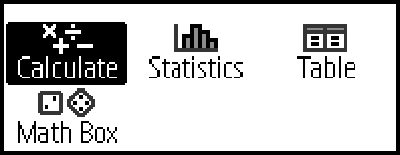
2. Use the cursor keys ( ,
,  ,
,  ,
,  ) to select the calculator app icon you want.
3. Press  to display the initial screen of the calculator app whose icon you selected.
Installed Calculator App List
| Icon | Description |
|---|---|
 (Calculate) |
General calculations |
 (Statistics) |
Statistical and regression calculations |
 (Table) |
Generates a number table based on one or two functions |
 (Math Box) |
The following functions to support math learning. Dice Roll, Coin Toss: Probability simulation |