fx-82CW I fx-85CW I fx-350CW
Before Using the Calculator
- ▶Read This First
- ▶Initializing the Calculator
- ▶Calculator "Get Started" Screen
- ▶Precautions
- ▶Getting Started
Calculator Apps and Menus
Inputting Expressions and Values
- ▶Basic Input Rules
- ▶Inputting an Expression Using Natural Textbook Format (MathI/MathO or MathI/DecimalO Only)
- ▶Overwrite Input Mode (LineI/LineO or LineI/DecimalO Only)
Basic Calculations
- ▶Arithmetic Calculations
- ▶Fraction Calculations
- ▶Powers, Power Roots, and Reciprocals
- ▶Pi, Natural Logarithm Base e
- ▶Calculation History and Replay
- ▶Using Memory Functions
Changing Calculation Result Format
- ▶Using the FORMAT Menu
- ▶Standard and Decimal Conversion
- ▶Prime Factorization
- ▶Improper Fraction and Mixed Fraction Conversion
- ▶Engineering Notation
- ▶Sexagesimal Conversion (Degree, Minute, Second Calculations)
Advanced Calculations
- ▶Function Analysis
- ▶Probability
- ▶Numeric Calculations
- ▶Angle Unit, Polar/Rectangular Coordinate, Sexagesimal
- ▶Hyperbolic, Trigonometric
- ▶Others
Registering and Using Defining Equations for f(x) and g(x)
Using QR Code Functions
Using Calculator Apps
Technical Information
- ▶Errors
- ▶Before Assuming Malfunction of the Calculator...
- ▶Replacing the Battery
- ▶Calculation Priority Sequence
- ▶Calculation Ranges, Number of Digits, and Precision
- ▶Specifications
Frequently Asked Questions
Using the CATALOG Menu
Press

to display the CATALOG menu. This menu shows categories of the commands, functions, and symbols in accordance with the calculator app you are currently using and the current status (displayed screen or current settings) of the app.
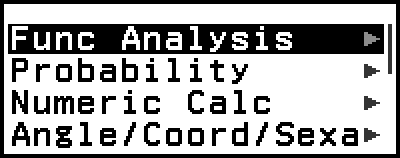
Example: CATALOG menu of the Calculate app
Note
For information about how to input commands, functions, and symbols from the CATALOG menu, see "Advanced Calculations".
For information about the commands, functions, and symbols specific to each calculator app, refer to the calculator app descriptions in "Using Calculator Apps".

Key and
Key