
Module No. 5731
Watch Face Items
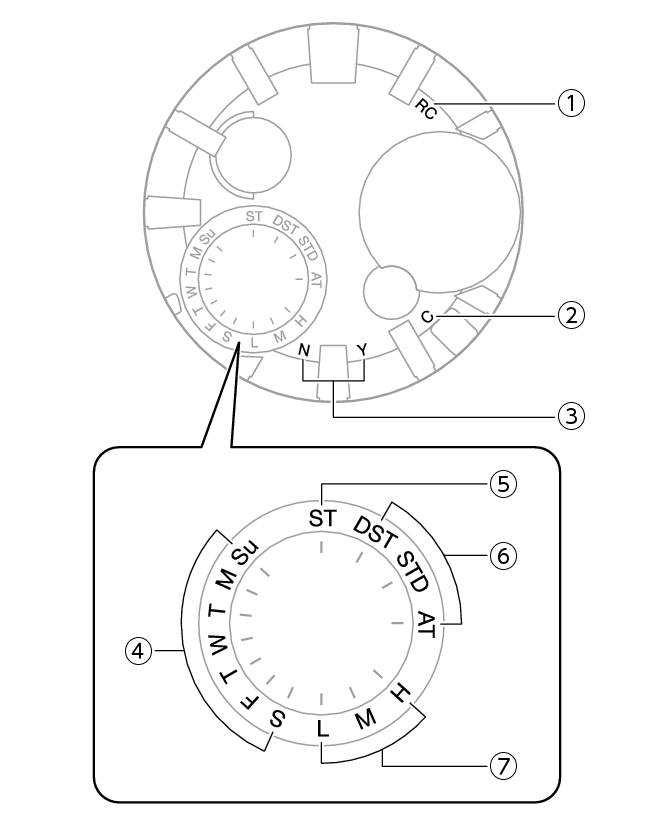
-
[RC]
-
[C]
-
Last receive result/Auto time correction setting
-
Day of week
-
[ST]
-
Summer time setting
-
Battery level
The second hand points to this mark while calibration signal reception is in progress.
The second hand points to this mark while there is a connection between the watch and a phone.
The second hand points to [Y(YES)] or [N(NO)] to indicate the result of the last auto time correction operation based on time signal reception or connection with a phone.
[Y(YES)]: Auto time correction successful
[N(NO)]: Auto time correction failed
The second hand indicates whether auto time correction is enabled or disabled.
[Y(YES)]: Auto time correction enabled
[N(NO)]: Auto time correction disabled
In the Calendar Mode, the mode hand points to the day of the week in the Home City.
In the Stopwatch Mode, the mode hand points to [ST].
The mode hand points to the current summer time setting.
The battery level is indicated by the mode hand after you enter the Calendar Mode.