
Watch Face Items
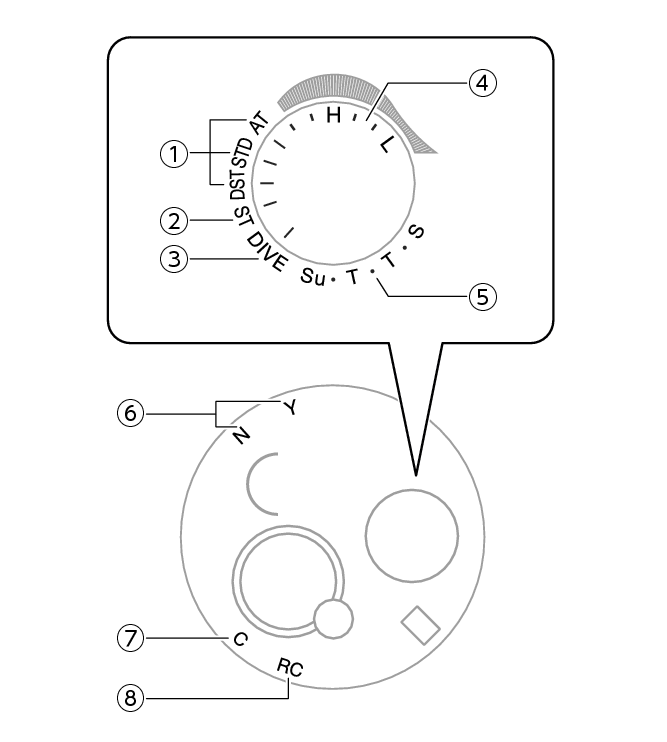
- ①
-
Summer time setting
The mode hand points to the current summer time setting.
- ②
-
[ST]
In the Stopwatch Mode, the mode hand points to [ST].
- ③
-
[DIVE]
In the Dive Mode, the mode hand points to [DIVE].
- ④
-
Tide Level
In the Tide Graph Mode, the mode hand points to the current tide level in the specified port.
- ⑤
-
Day of week
In the Calendar Mode, the mode hand points to the day of the week in the Home City.
- ⑥
-
Last receive result, phone connection status, Airplane Mode setting
Last receive result:
The second hand indicates the last receive result if the watch has never been paired with a phone, or if the phone pairing data has been deleted on the watch.
[Y(YES)]: Auto time adjustment successful
[N(NO)]: Auto time adjustment failed
Phone connection status:
The second hand indicates the phone connection status if the watch has been paired with a phone.
[Y(YES)]: The watch is connected to your phone.
[N(NO)]: The watch is not connected to your phone.
Airplane Mode setting:
The second hand indicates if auto time adjustment (Airplane Mode) is enabled or disabled.
[Y(YES)]: Auto time adjustment enabled (Airplane Mode disabled)
[N(NO)]: Auto time adjustment disabled (Airplane Model enabled)
- ⑦
-
[C]
When connection with the phone starts, the second hand will point to [C].
- ⑧
-
[RC]
The second hand points to [RC] while time calibration signal reception is in progress.
 Top of page
