
Configuring City and Summer Time Settings
Use the procedure in this section to select a Home City and configure its summer time setting.
World Time
Your watch lets you select from among city codes for 24 cities around the globe. Selecting a city code causes the watch’s time setting to change automatically to indicate the current time in that zone.
-
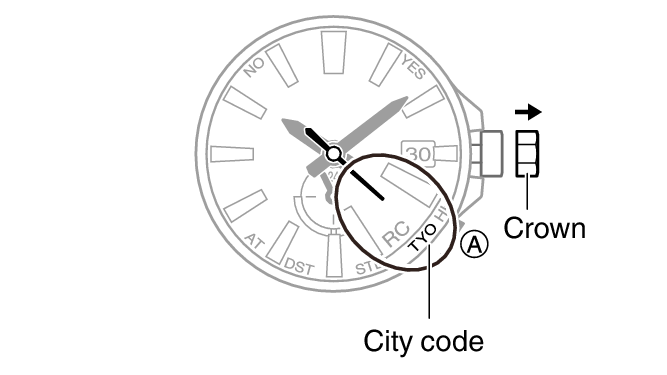
1.Pull out the crown to the first click.
-
The second hand will move to the currently selected city code.
-
2.Rotate the crown to move the second hand to the city you want to set.
-
- If you do not want to change the summer time setting, advance to step 5.
-
3.To change the summer time setting, press (A).
-
The second hand will move to the current summer time setting.
- “AT (AUTO)”
The watch switches between standard time and summer time automatically. Summer Time Table
- “STD”
The watch always indicates standard time.
- “DST”
The watch always indicates summer time.
- After about three seconds, the second hand will return to the currently selected city code.
- “AT (AUTO)”
-
4.To change the summer time setting, hold down the (A) button for about one second.
-
Each time you hold down the (A) button for about one second, the setting will cycle through options in the sequence shown below.
“AT (AUTO)” “STD”“DST”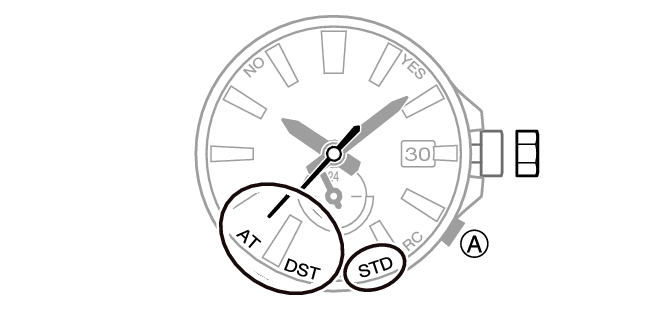
-
5.Push the crown back in to its normal position.
 Top of page