
Module No. 3568
Connecting with a Phone
Your watch automatically connects with its paired phone.
The 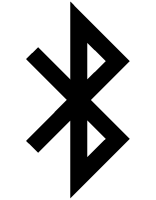 symbol is displayed at the top of the watch screen while the watch is connected with a phone. flashes when there is no connection between the watch and a phone.
If the watch is not paired with the phone you want to connect with, refer to the information below and pair them.
 Pair the watch with your phone
Important!
If you have problems establishing a connection, it could mean that CASIO WATCHES phone app is not running on your phone. On your phone’s home screen, tap the “CASIO WATCHES” icon. Perform the operation shown on the screen to pair with the watch.