Calculation Priority Sequence
The calculator performs calculations according to a calculation priority sequence.
Basically, calculations are performed from left to right.
Expressions within parentheses have the highest priority.
The following shows the priority sequence for each individual command.
| 1 | Parenthetical expressions |
|---|---|
| 2 | Functions that have parentheses (sin(, log(, f(, g(, etc., functions that take an argument to the right, functions that require a closing parenthesis after the argument) |
| 3 | Functions that come after the input value
(x2,
x3,
x-1,
x!,
°’ ”,
°,
r,
g,
%,
 t),
powers ( t),
powers ( ),
roots ( ),
roots ( ) )
|
| 4 | Fractions |
| 5 | Negative sign ((-)), Base Prefix (d, h, b, o) |
| 6 | Unit conversion commands (cmin, etc.), Statistics app estimated values (xˆ, yˆ, xˆ1, xˆ2) |
| 7 | Multiplication where the multiplication sign is omitted |
| 8 | Permutation (nPr), combination (nCr), complex number polar coordinate symbol (∠) |
| 9 | Dot product (•) |
| 10 | Multiplication (×), division (÷) |
| 11 | Addition (+), subtraction (−) |
| 12 | and (logical operator) |
| 13 | or, xor, xnor (logical operators) |
Precautions when a calculation contains negative values
If a calculation contains a negative value, you may need to enclose the negative value in parentheses. If you want to square the value -2, for example, you need to input: (-2)2. This is because x2 is a function preceded by a value (Priority 3, above), whose priority is greater than the negative sign, which is a prefix symbol (Priority 5).
Example:

 ((-))2
 -22 = -4
 ((-))2
 (-2)2 = 4
Precautions when using the  key in a calculation
The data that is input when you press the key depends on the current  – [Calc Settings] > [
 Key] setting. Calculation priority depends on the syntax of the formula that is input. Because of this, changing the above setting may affect calculation results even if the formula is input using identical key operations.
To calculate 100 ÷ 2 × 10²
Example 1
When " (Sci Notat)" is selected for [ Key] (initial default): 2 × 10² calculation priority is higher, so the result is 100 ÷ (2 × 10²) = 12.
- 100
 22
22 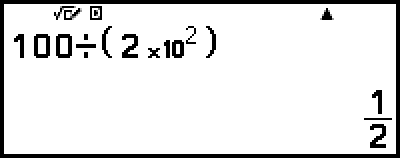
Example 2
When " (Power)" is selected for [ Key]: 100 ÷ 2 calculation priority is higher, so the result is (100 ÷ 2) × 102 = 5000.
- 10022
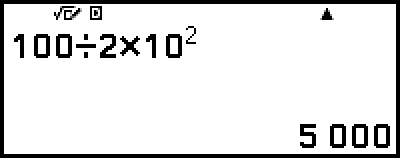
Note
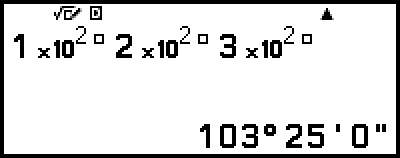
When " (Sci Notat)" is selected for [ Key], parentheses will be inserted automatically as shown in the Example 1 above. Note, however, that parentheses will not be inserted automatically if you input the sexagesimal symbol ( ) immediately after
  .
.
- 12

 (
( )22()
)22()
32()