Errors
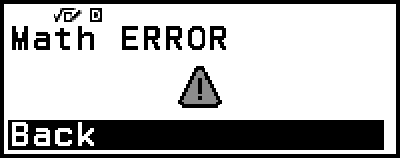
The calculator will display an error message whenever an error occurs for any reason during a calculation.
Displaying the Location of an Error
While an error message is displayed, pressing  ,
,  , or
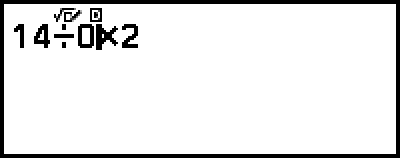
, or  returns to the screen that was displayed immediately before the error message appeared. The cursor will be positioned at the location where the error occurred, ready for input. Make the necessary corrections to the calculation and execute it again.
Example: When you input 14 ÷ 0 × 2 by mistake instead of 14 ÷ 10 × 2.
- 14
 0
0 2
2
- (or or )
 1
1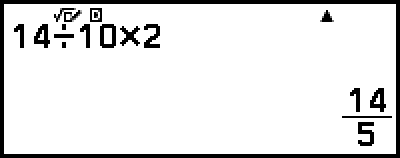
Error Messages
Syntax ERROR
Cause:
There is a problem with the format of the calculation you are performing.
Action:
Make necessary corrections.
Math ERROR
Cause:
The intermediate or final result of the calculation you are performing exceeds the allowable calculation range.
Your input exceeds the allowable input range (particularly when using functions).
The calculation you are performing contains an illegal mathematical operation (such as division by zero).
Action:
Check the input values, reduce the number of digits, and try again.
When using a variable as the argument of a function, make sure that the variable value is within the allowable range for the function.
Stack ERROR
Cause:
The calculation you are performing has caused the capacity of the numeric stack or the command stack to be exceeded.
Action:
Simplify the calculation expression so it does not exceed the capacity of the stack.
Try splitting the calculation into two or more parts.
Argument ERROR
Cause:
There is a problem with the argument of the calculation you are performing.
Action:
Make necessary corrections.
Range ERROR (Spreadsheet app only)
Cause:
During batch input in the Spreadsheet app, input for Range is outside the allowable range or is a cell name that does not exist.
Action:
For Range, input a cell name within the range of A1 through E45, using the syntax: "A1:A1".
Circular ERROR (Spreadsheet app only)
Cause:
There is a circular reference (such as "=A1" in cell A1) in the spreadsheet.
Action:
Change cell contents to remove the circular references.
Memory ERROR (Spreadsheet app only)
Cause:
You are attempting to input data that exceeds the allowable input capacity (2,380 bytes).
You are attempting to input data that results in a chain of consecutive cell references (such as cell A2 referenced from cell A1, cell A3 referenced from cell A2…, etc.) This type of input always causes this error to be generated, even if memory capacity (2,380 bytes) is not exceeded.
Action:
Delete unneeded data and input data again.
Minimize input that results in a chain of consecutive cell references.