Calculation Priority Sequence
The calculator performs calculations according to a calculation priority sequence.
Basically, calculations are performed from left to right.
Expressions within parentheses have the highest priority.
The following shows the priority sequence for each individual command.
| 1 | Parenthetical expressions |
|---|---|
| 2 | Functions that have parentheses (sin(, log(, etc., functions that take an argument to the right, functions that require a closing parenthesis after the argument) |
| 3 | Functions that come after the input value (x2, x-1, x!, °’ ”, °, r, g, %,  t), powers ( t), powers ( ), roots ( ), roots ( ) ) |
| 4 | Fractions |
| 5 | Negative sign ((-)), Base Prefix (d, h, b, o) |
| 6 | Statistics app estimated values (xˆ, yˆ, xˆ1, xˆ2) |
| 7 | Multiplication where the multiplication sign is omitted |
| 8 | Permutation (nPr), combination (nCr) |
| 9 | Multiplication (×), division (÷) |
| 10 | Addition (+), subtraction (−) |
| 11 | and (logical operator) |
| 12 | or, xor, xnor (logical operators) |
Precautions when a calculation contains negative values
If a calculation contains a negative value, you may need to enclose the negative value in parentheses. If you want to square the value -2, for example, you need to input: (-2)2. This is because x2 is a function preceded by a value (Priority 3, above), whose priority is greater than the negative sign, which is a prefix symbol (Priority 5).
Example:

 ((-))2
 -22 = -4
 ((-))2
 (-2)2 = 4
Precautions when using the  key in a calculation
Pressing inputs the function  , which takes arguments before and after it with the form a
 n (n is an integer) and returns the result of 10n multiplied by a.
Example:
- 100
 22
22 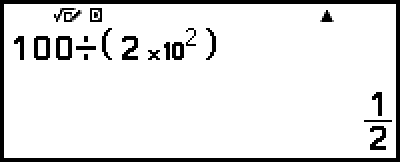
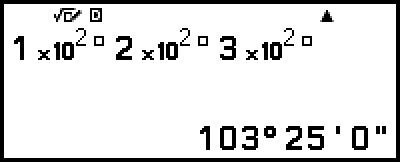
When you input the function within a calculation, executing the calculation automatically inserts parentheses as shown in the above example. Note, however, that parentheses will not be inserted automatically if you input the sexagesimal symbol ( ) immediately after .
- 12

 (
( )22()
)22()
32()