Calculator Apps
Selecting a Calculator App
Select a calculator app that is suitable for the type of calculation you want to perform.
1. Press  to display the HOME screen.
For information about each calculator app, see the "Installed Calculator App List".
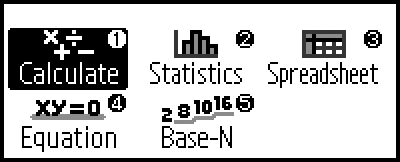
2. Use the cursor keys to move the highlighting to the icon of the app you want to start up, and then press  .
.
Alternatively, you can press a key that is shown in the upper right corner of the icon to start up an app.
If 1 is shown in the upper right corner of the icon, press  .
.
Installed Calculator App List
| Icon | Description |
|---|---|
 (Calculate) |
General calculations |
 (Statistics) |
Statistical and regression calculations |
 (Spreadsheet) |
Spreadsheet calculations |
 (Equation) |
Simultaneous equations and higher-order equations |
 (Base-N) |
Calculations involving specific number systems (binary, octal, decimal, hexadecimal) |