Fraction Calculations
Note that the input method for fractions depends on the current Input/Output setting on the SETTINGS menu.
To input 73 (improper fraction)
(Input/Output: MathI/MathO or MathI/DecimalO)
 7 7 3 or 73 3 or 73 |
73 |
(Input/Output: LineI/LineO or LineI/DecimalO)
| 73 |
 |
(a) Numerator, (b) Denominator
To input 2 13 (mixed number)
(Input/Output: MathI/MathO or MathI/DecimalO)
 ( ( )2 )2 13 13 |
2 13 |
(Input/Output: LineI/LineO or LineI/DecimalO)
| 213 |
 |
(a) Numerator, (b) Denominator, (c) Integer Part
Example: 23 + 1 12 = 136
(Input/Output: MathI/MathO)
- 23
 ()112
()112
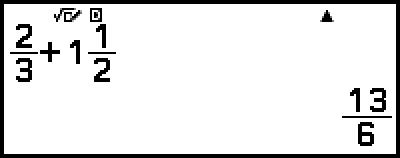
(Input/Output: LineI/LineO)
- 23112
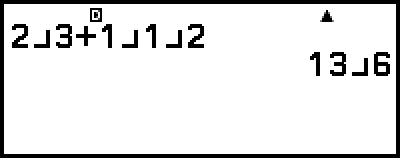
Note
Fractions in calculation results are displayed after being reduced to their lowest terms.
To convert a calculation result format to improper fraction or mixed number, press  (
( ). For more information, see "Improper Fraction and Mixed Number Conversion".
Fraction Format Calculation Results
A calculation result whose total number of digits used in the mixed number (including integer, numerator, denominator, and separator symbol  ) is greater than 10 cannot be displayed using fraction format. In this case, the calculation result is displayed as a decimal value.
Example 1: 11123456 = 123457123456
(Input/Output: LineI/LineO)
- 11123456

Since the total number of digits of the value 11123456 is 10, the result is displayed as a fraction value.
Example 2: 111234567 (= 12345681234567) = 1.00000081
(Input/Output: LineI/LineO)
- 111234567

Since the total number of digits of the value 111234567 is 11, the result is displayed as a decimal value.
Note
Mixing fractions and decimal values in a calculation while something other than MathI/MathO is selected will cause the result to be displayed as a decimal value.